



Open source & self-hosted. Reqad is a free control panel for Rocky Linux, AlmaLinux and RHEL - manage hosting, email, DNS, SSL, WordPress and multiple PHP versions from one clean dashboard.
cPanel-like ease without the licensing. Built for running your own domains or client sites on a single VPS, with predictable costs.

- Hosting accounts - per-domain accounts with disk-usage monitoring
- Email - Exim + Dovecot + Roundcube webmail + SpamAssassin, with SPF, DKIM, SRS, forwarders and autoresponders
- WordPress toolkit - install, one-click login, page cache, security hardening and PageSpeed scores per site (details below)
- Multiple PHP versions - per-account PHP 7.x/8.x with OPcache, APCu and a full
php.inieditor - SSL/TLS - Let's Encrypt & ACME certificates for the panel and every hosted domain
- DNS management - Cloudflare, cPanel and PowerDNS providers, with wildcard support
- Databases - MySQL/MariaDB with phpMyAdmin
- cPanel migration - import existing accounts with domains, mail and databases
- File manager - account-level, with CodeMirror editor, bulk operations, chmod and archive support
- More tools - browser terminal, SSH keys, cron jobs, backups and service control
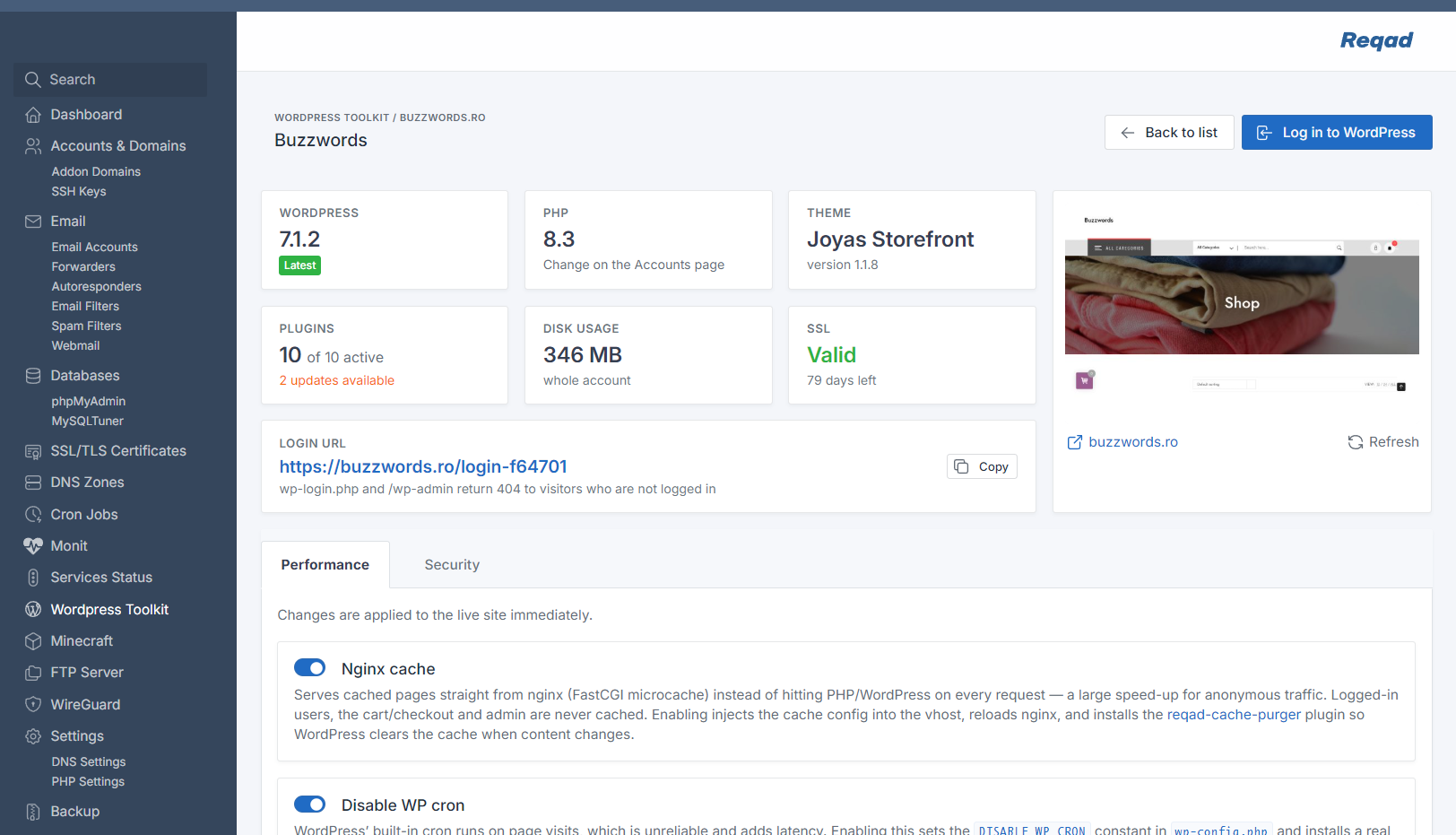
Each WordPress site gets its own management page:
- Install and discover - one-click install with the database created automatically. A rescan finds existing installs, including ones in subfolders.
- One-click login - opens wp-admin straight from the panel.
- Site overview - WordPress, PHP and theme versions, pending plugin updates, disk usage, SSL status and the login URL.
- Screenshot and PageSpeed - a site screenshot plus Google PageSpeed scores for performance, accessibility, best practices and SEO.
- Performance - Nginx page cache, a real system cron in place of WP-Cron, a search-engine indexing switch, and a maintenance mode that returns HTTP 503 so search engines come back later.
- Security hardening - per-site switches with recommended defaults:
- Web server rules: block
xmlrpc.php,wp-config.php, sensitive files and author scans; forbid PHP inwp-includes, uploads and cache directories; add security headers; block aggressive crawlers; allow logins only from listed IPs. - WordPress settings: hide the WordPress version, disable dashboard file editing, turn off pingbacks, move the login to a custom URL.
- Files: regenerate the security keys and restrict file permissions.
- Web server rules: block
On Nginx servers, turning on Nginx cache serves pages straight from a FastCGI cache, without running PHP for anonymous visitors. Logged-in users, the cart, checkout and wp-admin are never cached.
Reqad also installs its companion WordPress plugin, Reqad Cache Purger. The plugin clears the cache automatically when content is published, updated, trashed or deleted. It also adds a purge button to the admin bar, an optional cache warmer and a cache self-test.
Try Reqad without installing anything - a live demo panel is available at reqad.com/demo.
- OS: Rocky Linux, AlmaLinux or RHEL 8 / 9 - a fresh, clean install
- Architecture: x86_64
- Access: root over SSH
- A reqad.com account - free registration at reqad.com
Stack it manages: Nginx / Apache · MariaDB · Exim / Dovecot · PHP / Roundcube · PowerDNS / Cloudflare · Let's Encrypt · WordPress · Monit · CSF firewall.
One command on a fresh EL8 or EL9 server - the same command for both, it detects which one you are on:
bash <(curl -sSL https://repo.reqad.net/install.sh)It checks the server, then opens a terminal UI to choose the web server, PHP version, whether to install the mail stack, the SSH port and the timezone:
┌──────────────────────────────────────────────────────────┐
│ Rocky Linux 9.4 (Blue Onyx) · x86_64                     │
│ srv1.example.com   203.0.113.10   4 vCPU   7.8G RAM      │
├──────────────────────────────────────────────────────────┤
│ ▸ Web server    [ nginx + php-fpm ] [ apache + mod_php ] │
│   PHP version   [ 7.4 ] [ 8.2 ] [ 8.3 ] [ 8.4 ] [ 8.5 ]  │
│   Email stack   [ no ] [ yes ]                           │
│   SSH port      22                                       │
│   Timezone      Europe/Bucharest                         │
├──────────────────────────────────────────────────────────┤
│                    Start installation                    │
└──────────────────────────────────────────────────────────┘
  ↑↓ move · ←→ change · ⏎ select · q quit
Pick Start installation and it sets up the web stack, MariaDB, SSL and - if you asked
for it - the mail stack. A log of the run is kept at
/var/tmp/reqad-install/install_reqad.log.
Pass any option and the UI is skipped, using the defaults for anything you leave out:
bash <(curl -sSL https://repo.reqad.net/install.sh) \
  --template nginx_php-fpm \
  --php 8.4 \
  --email \
  --ssh-port 1922 \
--timezone 'Europe/Bucharest'| Option | Default | What it does |
|---|---|---|
--template |
nginx_php-fpm |
Web server stack: nginx_php-fpm or apache_modphp |
--php |
8.3 |
PHP version: 7.4, 8.2, 8.3, 8.4 or 8.5 |
--email / --no-email |
off | Install Exim, Dovecot and Roundcube |
--ssh-port |
22 |
Moves SSH to another port and disables password auth |
--timezone |
server's current | Sets the server clock, e.g. Europe/Bucharest |
--skip-update |
— | Skips the initial system update and package install |
-y, --yes |
— | Runs with every default, no UI |
--dry-run |
— | Prints what would be installed and changes nothing |
--help |
— | Lists every option |
Note. The installer does not read environment variables. The older
install-el8.sh/install-el9.shscripts, and theSSH_PORT/TIMEZONE/TEMPLATE/PHP_VERSION/WITH_EMAILvariables they used, are replaced by the singleinstall.shand the options above.
During early access the package repository is access-controlled: register at reqad.com and send the server's public IP so it can be allow-listed before running the installer.