
Statistical disclosure control (SDC) for tabular data, with a Python library, a command-line interface and an optional interactive terminal UI.
Protect sensitive cells with primary and secondary suppression, or apply controlled rounding. The native Tau-Argus engine uses the open-source HiGHS solver. Released wheels bundle both, so no separate engine or licensed solver is needed.
| Interface | Use it for | Entry point |
|---|---|---|
| Python library | Protect DataFrames or Parquet data in Python; generate inputs or run existing batches | from pytauargus import protect |
| Command-line interface | Automate Parquet protection or run legacy .arb batches in scripts and pipelines |
tauargus |
| Interactive terminal UI | Inspect tables, mark cells and preview suppression or rounding interactively | tauargus-tui |
The Python library and CLI are included in pytauargus. The TUI is the
separate, optional pytauargus-tui package and uses the same engine.
Method support: OPT, MOD and RND are implemented and regression-tested. CKM has a dispatch path without a dedicated end-to-end regression suite. GH, NET and CTA are rejected by the engine. See protection, audit and compatibility for the scope of validation and differences from legacy Tau-Argus.
Install the Python library and CLI:
pip install --upgrade pytauargus
tauargus --version
Choose extras for the workflows you need:
| Workflow | Install |
|---|---|
| Pandas examples and DataFrame output | pip install --upgrade "pytauargus[dataframe]" |
| Parquet files and cloud URLs, in Python or the CLI | pip install --upgrade "pytauargus[parquet]" |
| Interactive terminal UI | pip install --upgrade "pytauargus[tui]" |
Extras can be combined, for example pip install "pytauargus[dataframe,parquet,tui]".
The TUI can also be installed directly with pip install pytauargus-tui;
this installs pytauargus and its CLI too.
Wheels are available for Python 3.11–3.15 on macOS arm64, Linux x86_64 and
aarch64 (glibc 2.28+), and Windows x64. For other platforms, see
building from source.
To pin a release, install pytauargus==<version>;
see the release history.
Install the dataframe extra for this example. Each input row represents
one respondent. protect() builds the table and totals, applies the safety
rules, adds secondary suppression and returns the results.
import pandas as pd
from pytauargus import protect

micro = pd.DataFrame({
    "Region": ["North"] * 6 + ["South"] * 6,
    "Sector": ["Retail"] * 3 + ["Services"] * 3
              + ["Retail"] * 3 + ["Services"] * 3,
    "Turnover": [100., 5., 5., 10., 10., 10., 20., 20., 20., 30., 30., 30.],
})
result = protect(
    micro, ["Region", "Sector"], response="Turnover",
    safety_rules="NK(2,75)", suppress="OPT(1)", workdir="tauargus_run",
)
table = result.tables[0]
publication = table.dataframe()[["Region", "Sector"]].copy()
publication["Turnover"] = table.safe()
publication.to_csv("protected.csv", index=False)
print(publication)
Here, NK(2,75) flags cells whose two largest contributors exceed 75% of the
response. OPT(1) selects optimal suppression for table 1.
result.tables contains one TableResult per requested table.
table.safe() masks primary and secondary suppressed responses with x;
table.safe(None) uses missing values instead. The example selects dimension
columns and adds the masked response to produce the publication table.
table.dataframe() contains original responses and diagnostics.
It does not mask them automatically. Masking with safe() does not perform
an audit; audit is an explicit operation.
Pandas is optional for the core API: column dicts, lists of row dicts and polars DataFrames are also accepted.
With the parquet extra, use a local Parquet path or an s3://, gs://
or https:// URL in place of the DataFrame:
from pytauargus import protect

result = protect(
    "s3://bucket/microdata.parquet",
    ["Region", "Sector"], response="Turnover",
    safety_rules="NK(2,75)", suppress="OPT(1)",
)
result.tables[0].to_parquet("s3://bucket/protected.parquet")
to_parquet() writes the dimension columns and response, with suppressed
cells as null. Cloud credentials come from the environment, as required by
pyarrow.
from pytauargus.engine import run_batch

engine = run_batch("demo.arb")
For multiple tables, result accessors, batch generators and lower-level engine calls, see the Python API guide and example notebooks.
The tauargus command runs without a display or interactive prompts.
Choose between direct protection of Parquet microdata and execution of
existing Tau-Argus batches.
Install the parquet extra, then specify the dimensions, response, safety
rule and output:
tauargus protect micro.parquet \
    --tables 'Region,Sector' --response Turnover \
    --safety 'NK(2,75)' --suppress 'OPT(1)' --out protected.parquet
The input can also be a cloud URL. A .parquet output suffix writes a
masked Parquet file; other output names write published CSV. Repeat
--tables to request multiple tables. No .arb file is needed.
Keep the .arb batch and its referenced data and metadata together.
Run from that directory:
tauargus run demo.arbThe batch specifies the tables, safety rules, protection methods and output files. See the batch-file guide for a complete batch example, path resolution and supported commands.
tauargus explore demo.arb
tauargus tables demo.arb
tauargus audit demo.arb
tauargus save demo.arb --format csv --out protected.csv
tauargus save demo.arb --audit --format intermediate --out audit.tab
Each command starts a new engine run. Batch-based commands such as tables,
audit and save execute the batch before their additional action; they
do not continue a previous CLI session. An INTERMEDIATE audit export is
diagnostic output containing original values.
Use tauargus --help to list commands and tauargus <command> --help
for options. The
CLI reference
also covers explicit suppression, rounding and apriori edits.
The CLI returns exit code 0 on successful execution; errors are written to stderr with a non-zero exit code. An audit reporting under-protected cells still returns 0: inspect its findings separately.
The bundled engine and solver work in containers and CI without a licensed solver or display. Linux wheels require glibc 2.28 or newer. Run independent jobs in separate processes and working/output directories; concurrent engine calls within one process are not validated.
tauargus-tui opens existing .arb batches in an interactive table view.
Use it to inspect cell values and safety status, make draft cell marks and
preview changes before accepting them.
Install the tui extra, then launch:
tauargus-tui                         # browse batches and saved workspaces
tauargus-tui path/to/batch.arb        # open a batch
tauargus-tui path/to/batch.workspace.json  # reopen a workspace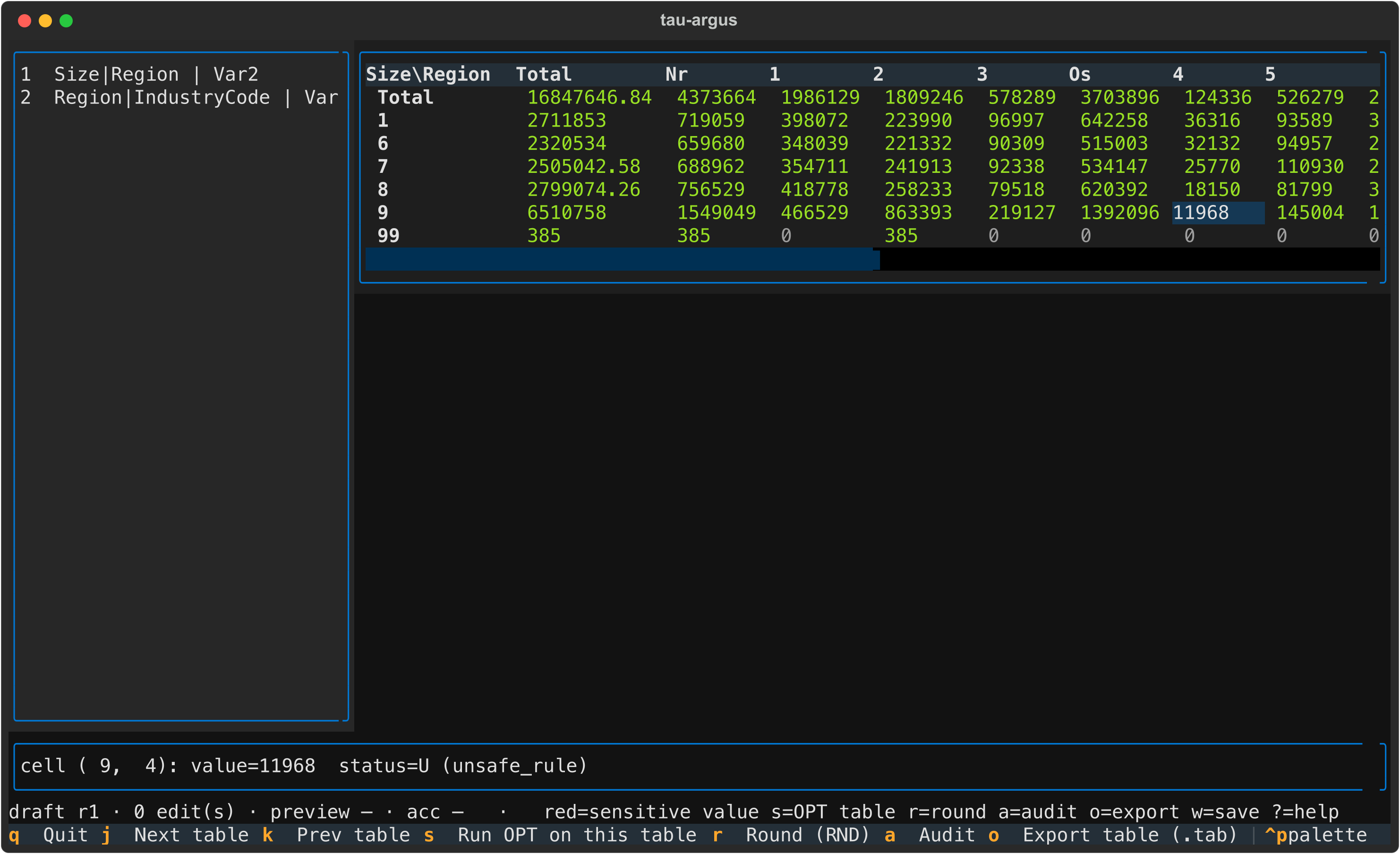
A typical session:
- Open a batch and browse its computed tables.
- Inspect a cell's value and status; mark cells for suppression or retention.
- Preview OPT suppression or RND rounding on a temporary copy.
- Accept or cancel the preview, then run an audit to inspect feasibility intervals.
- Save the workspace, or write a replay batch for headless execution.
The grid shows the first two dimensions and original responses, including
after rounding. Its o export writes a diagnostic INTERMEDIATE .tab,
so select publication output explicitly through the Python API or CLI.
Reopening a workspace or replaying a batch reruns the recipe and does not
guarantee identical numerical results.
See the TUI overview for capabilities and limitations, and the full user guide for keys, statuses, workspaces and replay.
Primary suppression hides sensitive cells, such as cells with few contributors or a dominant respondent. Secondary suppression hides additional cells so totals cannot reveal the primary cells, while minimising information loss. Controlled rounding is an alternative protection method.
An audit checks whether suppressed cells have sufficient uncertainty under
the configured protection requirements. It calculates realised lower and upper
bounds consistent with the published totals. It runs in-process, with no
separate intervalle.exe installation.
From Python, audit the first table explicitly:
rows = result.engine.audit(0) # zero-based table indexFrom the CLI, use tauargus audit demo.arb; in the TUI, press a.
These calls audit the table produced by each workflow. Raw tables and audit
reports contain original values and should be kept with analyst artifacts.
The project uses the legacy Tau-Argus 4.1 batch grammar and file formats as references. It does not guarantee complete feature compatibility or identical suppression patterns. HiGHS can choose different secondary suppressions from the legacy CPLEX backend. WRITETABLE types 6 (JJ) and 7 (CKM) are not implemented.
See compatibility and validation for method support, regression coverage, legacy comparisons and operational limits.
| Resource | Contents |
|---|---|
| Quickstart notebook | DataFrame protection, masked CSV, metadata and existing batches |
| Protection and audit notebook | OPT/MOD, explicit audit, masked export and batch rounding |
| Generators notebook | Generated inputs, multiple tables and custom batches |
| Python API guide | Arguments, results, diagnostics and generators |
| Batch files and CLI | Batch example, syntax and CLI commands |
| TUI user guide | Interactive workflow and keyboard reference |
| Compatibility and validation | Supported methods, numerical differences and test scope |
| Development | Source builds, repository layout, tests and running notebooks |
The native engine and thin bindings live in tauargus-engine. The R front-end is rtauargus.
This project builds on Tau-Argus, its statistical methods and native libraries, and the R and Python tools around it, developed by the people named below.
The original Tau-Argus authors and contributors include Statistics Netherlands (CBS), Peter-Paul de Wolf, Anco Hundepool, Sarah Giessing (GHMITER and audit), Juan José Salazar González (optimisation methods), and Jordi Castro (network solutions and CTA).
| Component | Authors and contributors |
|---|---|
libtauargus (core) |
Statistics Netherlands and Peter-Paul de Wolf. |
CSP (cell suppression) |
Matteo Fischetti, Juan José Salazar González, and M. D. Montes de Oca. |
CRP (controlled rounding) |
Juan José Salazar González. |
tauhitas (modular suppression) |
Statistics Netherlands and Peter-Paul de Wolf. |
taurounder (rounding interface) |
Statistics Netherlands and Peter-Paul de Wolf. |
The engine uses HiGHS as its open-source LP/MIP solver.
rtauargus is developed at
INSEE / InseeFrLab by Pierre-Yves Berrard, Julien Jamme, Nathanaël Rastout,
Jeanne Pointet, Félix Beroud, André-Raymond Socard, Wistan Pomel,
Clara Baudry, and contributors.
Its metadata, batch and hierarchy generation logic was ported to
pytauargus; its micro_rtauargus() workflow also informed the high-level
protect() pipeline.
PiArgus (piargus), by
Laurent Verweijen (lverweijen) and
contributors, inspired the DataFrame-to-table workflow and TableResult
with its safe(), status(), unsafe() and dataframe() accessors.
GaussSuppression is developed at Statistics Norway by Øyvind Langsrud, Daniel Lupp, Hege Bøvelstad and contributors. The protection regression tests adapt the dominance example from its magnitude-table vignette.
EUPL-1.2. Tau-Argus is (c) Statistics Netherlands.