
Small command line application to do p2p file copy behind firewalls without a central server.
It uses the UDT protocol via a pure C# port of UDT (vendored in this repo, no native code), does UDP hole punching to get through NATs, and ships as a single small native executable for Linux, macOS and Windows thanks to .NET 10 and Native AOT. Everything that goes over the wire is encrypted and checksummed.
You are on a Slack/Teams/whatever session and need to send a 10GB virtual machine to a team mate. Uploading it to a central server doesn't seem to be a good option, so you would love to just start a P2P private connection between the two to send a file.
This is exactly what p2pcopy is all about.
And I guess I'm just yet another one looking at the xkcd:File Transfer thing:
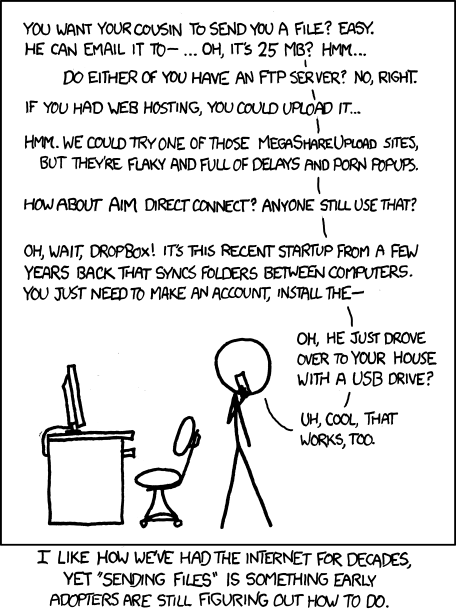
Other (nicer) alternatives exist: web based (WebRTC), or tools like croc, magic-wormhole or sendme. All of them are great, but all of them need a server somewhere: a relay, a "mailbox", a rendezvous service. I wanted a command line solution where the exchange of addresses is done by the two humans, over the chat they already have open, and nothing else is involved. The only external parties p2pcopy ever talks to are public STUN servers, and all they get is a 20 byte "what's my address?" question.
Ten years after the first version the idea still holds, so this is the same tool rebuilt with everything that was learned in between.
One native executable per platform, about 6 MB, no runtime to install. Pick whichever is easiest:
Linux and macOS
curl -fsSL https://raw.githubusercontent.com/psantosl/p2pcopy/master/install.sh | sh
It detects your OS and CPU, downloads the matching build from the latest release, checks its SHA-256 and puts p2pcopy in /usr/local/bin (or ~/.local/bin if that is not writable). Set P2PCOPY_VERSION=2.0.0 to pin a version or P2PCOPY_INSTALL_DIR to choose the directory. Because the file never goes through a browser it does not get macOS's quarantine flag, so there is no "unidentified developer" dialog to fight.
Windows (PowerShell)
irm https://raw.githubusercontent.com/psantosl/p2pcopy/master/install.ps1 | iex
Same idea: downloads, verifies, installs to %LOCALAPPDATA%\Programs\p2pcopy and adds it to your user PATH.
By hand
Grab the archive for your platform from the releases page, unpack it anywhere on your PATH. On macOS, if you downloaded it with a browser, run xattr -d com.apple.quarantine p2pcopy once.
The two peers run p2pcopy, one as send and the other as receive. Each one prints a code. You paste your code to your peer, your peer pastes theirs to you (often only one of the two is needed), and the transfer starts.
$ p2pcopy send ubuntu-vm.ova

          ____
  _ __   |___ \   _ __     ___    ___    _ __    _   _
 | '_ \    __) | | '_ \   / __|  / _ \  | '_ \  | | | |
 | |_) |  / __/  | |_) | | (__  | (_) | | |_) | | |_| |
 | .__/  |_____| | .__/   \___|  \___/  | .__/   \__, |
 |_|             |_|                    |_|      |___/
v2.0.0  ·  peer-to-peer file copy, no server in between

› Ready to send 1 file(s), 10.2 GB
╭───────────┬───────────────────────────────┬───────────────────────╮
│ Candidate │ Address                       │ Note                  │
├───────────┼───────────────────────────────┼───────────────────────┤
│ LAN       │ 192.168.1.23:41222            │ same network only     │
│ IPv6      │ [2a02:9b0:41c:1f3e::23]:41222 │ direct, no NAT        │
│ Public    │ 83.44.120.9:41222             │ via STUN, cone NAT    │
╰───────────┴───────────────────────────────┴───────────────────────╯
╭─ Your code ─────────────────────────────────────────────────╮
│ 044j86pzew6tbs7re7m3nw812jqwkg000819cdg                     │
│ copied to your clipboard                                    │
╰─────────────────────────────────────────────────────────────╯
Send it to your peer. You look directly reachable, so they probably only need this.
? Peer's code (or just wait if they only needed yours, until 18:42): █
Alice pastes the code into the chat and waits.
$ p2pcopy receive
…
╭─ Your code ─────────────────────────────────────────────────╮
│ 044bbaep2cbdazz98xayjfg12jr2sg00081dkbr                     │
│ copied to your clipboard                                    │
╰─────────────────────────────────────────────────────────────╯
Send it to your peer and paste theirs below.
? Peer's code (until 18:43): 044j86pzew6tbs7re7m3nw812jqwkg000819cdg
✔ Connected to alice-desktop at [2a02:9b0:41c:1f3e::23]:41222 via UDT over UDP  AES-256-GCM
╭─ Incoming 1 file(s), 10.2 GB ───────────────────────────────╮
│ /home/bob                                                   │
│ └── ubuntu-vm.ova 10.2 GB                                   │
╰─────────────────────────────────────────────────────────────╯
Accept? [y/n] (y): y
Receiving 1 file(s) ━━━━━━━━━━━━━━━━━━━╸━━━━━━━━━━ 61%  6.2/10.2 GB  112 MB/s  00:35
Bob pastes Alice's code, and that was it: Alice's terminal lights up with "Connected", the progress bar runs on both sides, and at the end both see a summary with the SHA-256 verification.
Whoever presses Enter second triggers the connection. There is nothing to time, and the first one can wait up to ten minutes at the prompt (the prompt shows until when) without anything expiring.
Some NATs are just hostile. If after ten minutes nothing connected, p2pcopy explains what it saw on both sides instead of failing silently:
✘ Could not reach your peer.
  Your side  cone NAT
  Peer side  symmetric NAT

  • Your peer's side is behind a symmetric NAT, which picks a new port for every destination. UDP hole punching rarely works through it.
  • Try from a different network: a phone hotspot is usually fine. Enabling UPnP on the router or using IPv6 also helps.
  • Retrying often works: NAT mappings and timing differ run to run. Swapping who sends and who receives can help too.
Two symmetric NATs cannot be punched, that is physics. One symmetric NAT often can, as long as the other side is the one being contacted. Retrying still helps, like in 1995 :P, but now the tool tells you why and what to change.
If a port worked for you once you can pin it with --port, so your router keeps using the same mapping.
Both sides can run without prompts, which makes p2pcopy usable from scripts or from another tool:
p2pcopy receive --out ~/Downloads --yes --json --code 044j86…
p2pcopy send backup.tar.zst --plain --code 044bbae…
--plain prints simple lines (automatic when output is piped), --json prints one JSON event per line and reads answers to prompts from stdin. Exit codes: 0 ok, 1 usage, 2 file problem, 3 could not connect, 4 transfer failed or declined, 130 cancelled.
All options:
p2pcopy send <paths>...        send files and/or directories
p2pcopy receive [--out DIR]    receive into DIR (default: current directory)

  -c, --code <code>   the other side's code (skips the prompt)
  -p, --port <port>   local UDP/TCP port (default: random)
  -y, --yes           receive: accept without asking, overwrite existing files
  -o, --out <dir>     receive: destination directory
      --stun <host[:port]>  STUN server to use (repeatable; also P2PCOPY_STUN env var)
      --timeout <s>   how long to keep trying to connect (default 600)
      --plain         no colours, no live progress
      --json          one JSON event per line
      --no-tcp        UDP hole punching only
      --ipv4          do not use IPv6
      --no-clipboard  do not copy the code to the clipboard
  -v, --verbose       show candidates, probes and transport details
The implementation is still simple, just a bit more thorough than it used to be:
- Each peer binds one UDP port, lists its own addresses (private IPv4, global IPv6) and sends a single RFC 8489 STUN binding request to a handful of public servers, all at once. The first two answers are enough: if they agree on the mapped port we have a cone NAT, if they disagree we have a symmetric one. This replaced the old list of 240 servers from a 2013 gist, which was tried one by one with a 3 second timeout each, and the full RFC 3489 classification dance, which ran three times per attempt.
- All of that (role, NAT class, candidates, and a 96 bit random secret) is packed into the code: Crockford base32 with a checksum, so
Oand0orland1don't matter and a typo is detected instead of sending you to a stranger. - Once a peer has the other's code it starts punching: small probe datagrams, authenticated with HMAC derived from the secret, to every candidate address, four times a second. The first pair that works in both directions is validated; the sender picks it and tells the receiver with a
SELECTprobe. Probes are laid out so that if one arrives late at a UDT socket it is dropped (its destination socket id is0xFFFFFFFF). - Then each side reuses that same UDP socket to create a UDT socket in rendezvous mode and connects to the other:
var udt = new UdtSocket(socket.AddressFamily, SocketType.Stream);
udt.Bind(socket);            // the very socket that did STUN and punching
udt.Connect(peerEndPoint);   // both sides call connect, nobody listens
Yes, each socket simply does connect and nobody is doing listen or accept, but it works. This is how hole punching goes, and it is the part that has not changed since 2016.
- In parallel, TCP gets a chance too: p2pcopy listens on the same port number and also connects to the peer from that port (TCP simultaneous open). Whatever connects first wins; the sender decides and the loser is closed. This covers the cases where UDP is blocked but a LAN or IPv6 route exists.
- On the chosen connection both sides exchange a clear text
HELLO(version, role, ciphers). Two senders or two receivers get a clear message instead of a crash. Then a session key is derived with HKDF from the pairing secret(s) and both nonces, and everything after that travels in AES-256-GCM (or ChaCha20-Poly1305) frames. - The file protocol is a manifest (files and directories with sizes), an accept/reject from the receiver, and then the data streamed in 256 KB frames with no application level acks: the transport already does flow control. Each file ends with its SHA-256, which the receiver verifies before renaming the temporary file into place. Paths coming from the sender are sanitized, so
../../.ssh/authorized_keysends up as a refused transfer, not a surprise.
The first versions had a trick I was quite fond of: since there is no server to synchronize the two sides, both peers fetched the time from NTP and agreed to "start" on second 0, 10, 20, 30… of every minute, so the UDT rendezvous attempts would overlap even if the humans hit Enter at different moments.
It worked, but it also meant waiting up to ten seconds per attempt, a hard dependency on NTP, and failed attempts that took half a minute to notice.
It turns out the synchronization was only needed because UDT's rendezvous connect has a short timeout. Punching with our own probes first removes the problem: the first peer just keeps sending probes (and a STUN keepalive every 20 seconds so its NAT mapping stays open) until the second peer shows up, for up to ten minutes. The NAT mapping stays alive while packets flow, so there is no window to hit. Whoever is second triggers the connection, and UDT only starts once both sides already know the path works.
While testing 40 MB transfers through the new code the receiver started getting garbage, but only when the receiving side was slower than the sender. UDT alone on loopback was fine, which made it look like my bug.
It was in the C# port of UDT. The original UDT sender buffer is a circular linked list of blocks, and when it needs to grow it splices the new blocks in right after the "last" block. The port replaced the list with an array of blocks and indices, and on growth it appended the new blocks at the end of the array. Once the ring had wrapped around (which happens as soon as acks start freeing the first blocks) the new, empty blocks landed in the middle of the data still to be sent. The old p2pcopy mostly dodged it because its stop-and-wait protocol never let the buffer grow while wrapped. The fix is a few lines in src/p2pcopy/Udt/Buffer.cs, with a regression test, and it is probably behind a good share of the "it connects but the copy is corrupt or stalls" reports over the years.
You need the .NET 10 SDK.
dotnet test
dotnet publish src/p2pcopy -c Release -r linux-x64 -o out
Replace the runtime identifier with osx-arm64, win-x64, linux-arm64, etc. The output is one native executable; no runtime, no DLLs next to it.
CI builds and tests on Linux, macOS and Windows on every push, and does a Native AOT smoke build. Pushing a v* tag runs the release workflow: it publishes binaries for linux-x64, linux-arm64, linux-musl-x64 (fully static), osx-x64, osx-arm64, win-x64 and win-arm64 and attaches them, with a SHA256SUMS file, to a GitHub release.
- Resuming an interrupted transfer.
- UPnP / NAT-PMP port mapping, which would make many more peers "directly reachable" and the single code case more common.
- A stdin/stdout mode to pipe
tarthrough it. - An interactive no-arguments wizard with a file picker.
MIT. The vendored UDT port is MIT as well; its notice is kept in src/p2pcopy/Udt/LICENSE.