


Admin panels for Phoenix LiveView, built from your Ecto schemas.
🚀 Live Demo • 📚 Documentation • 🛠️ Installation Guide • 🩵 Contribute
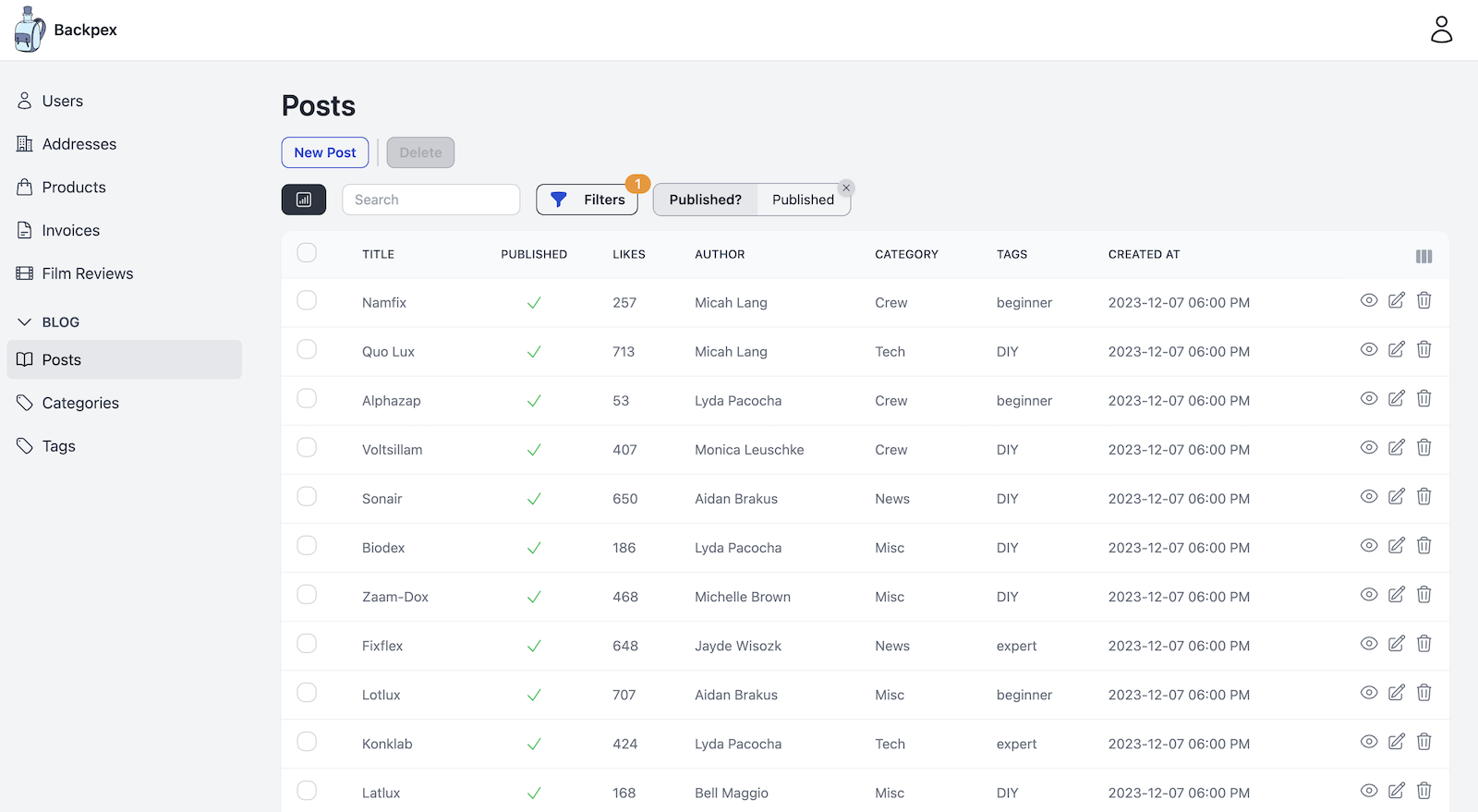
Backpex turns your existing Ecto schemas into a complete admin panel: index, show, edit and create views with search, filters, actions, metrics and authorization. Each resource is a single Elixir module, a LiveResource, that lives in your Phoenix app, uses your changesets and renders in your layout. Everything runs on LiveView, so there is no separate frontend to build and no second app to deploy.
- It's your code. A LiveResource is a plain module in your app. Backpex calls your changesets, your repo and your authorization rules instead of inventing its own.
- Declarative where it can be, extensible where you need it. Configure fields, filters and actions as data. When the built-ins don't fit, write your own field, filter or action module against a documented behaviour.
- Real-time by default. Built on Phoenix LiveView and PubSub: searches, filters and inline edits update instantly, and changes made by other users show up without a reload.
- Looks good out of the box. Styled with Tailwind CSS 4 and daisyUI 5, with a responsive app shell, a theme selector and full-width layouts.
defmodule MyAppWeb.PostLive do
  use Backpex.LiveResource,
    adapter_config: [
      schema: MyApp.Blog.Post,
      repo: MyApp.Repo,
      update_changeset: &MyApp.Blog.Post.update_changeset/3,
      create_changeset: &MyApp.Blog.Post.create_changeset/3
    ],
    layout: {MyAppWeb.Layouts, :admin}

  @impl Backpex.LiveResource
  def singular_name, do: "Post"

  @impl Backpex.LiveResource
  def plural_name, do: "Posts"

  @impl Backpex.LiveResource
  def fields do
    [
      title: %{module: Backpex.Fields.Text, label: "Title", searchable: true},
      published: %{module: Backpex.Fields.Boolean, label: "Published", index_editable: true},
      category: %{module: Backpex.Fields.BelongsTo, label: "Category", display_field: :name},
      inserted_at: %{module: Backpex.Fields.DateTime, label: "Created", only: [:index, :show]}
    ]
  end

  @impl Backpex.LiveResource
  def can?(assigns, :delete, _post), do: assigns.current_user.role == :admin
  def can?(_assigns, _action, _post), do: true
end
Mount it in your router and you get a searchable, sortable, paginated index with inline editing, plus show, edit and create views:
scope "/admin", MyAppWeb do
  pipe_through :browser

  backpex_routes()

  live_session :admin, on_mount: Backpex.InitAssigns do
    live_resources "/posts", PostLive
  end
end- 🧩 18 built-in field types: Text, Textarea, Number, Currency, Boolean, Select, MultiSelect, Checkgroup, Date, DateTime, Time, Email, URL and Upload, plus custom fields for everything else.
- 🔗 Associations: BelongsTo, HasMany and HasManyThrough, and InlineCRUD for editing embedded or associated rows inside the parent form.
- ✏️ Inline editing of fields on the index view, readonly and computed fields, panels to group fields on forms.
- 🪝 Hooks before and after an item is created, updated or deleted.
- 🔍 Search across fields, or PostgreSQL full-text search on a generated column.
- 🎛️ Filters: Boolean, Select, MultiSelect and Range, with presets, validated URL params and custom filters.
- 📈 Metrics: value metrics such as sums or averages above the index table, computed for the current search and filters.
- 🗂️ Column toggles: users show and hide columns and metrics on the index view.
↕️ Ordering and pagination with configurable defaults.
- ⚡ Item actions for single or selected rows (archive, approve, soft-delete) and resource actions for the whole resource (invite, import, export), both with optional forms and confirmation dialogs.
- 🔒 Authorization in one
can?/3callback, enforced by Backpex for every view, save, inline edit and action, plus per-field rules. Delegate to the policy library you already use.
- 💾 User preferences: theme, sidebar state, visible columns and metrics are remembered per user, in the session or in your database.
- 📡 Live updates via PubSub when items are created, updated or deleted.
- 🌍 Translations of every text Backpex renders, with Gettext or your own translator.
- ♿ Accessible: components are operable with the keyboard, and every demo resource is audited with axe in CI.
- 🧪 Testing helpers to drive your LiveResources from
Phoenix.LiveViewTestwithout depending on Backpex's markup.
Backpex ships with an Igniter installer. Install the Igniter archive once, then run the installer in your Phoenix app:
mix archive.install hex igniter_newmix igniter.install backpexIt configures PubSub, adds the JavaScript hooks, sets up daisyUI and Tailwind, adds the admin routes and creates an admin layout. Review the diff, then follow the installation guide for the remaining steps and your first LiveResource.
Prefer to set it up by hand? Add Backpex to your dependencies and follow the same guide:
def deps do
  [
    {:backpex, "~> 0.23"}
  ]
end- Elixir 1.16 or later
- Phoenix 1.7 or 1.8 and Phoenix LiveView 1.1
- Ecto with a single primary key per schema
- Tailwind CSS 4 and daisyUI 5
Using Ash? The community project ash_backpex connects Backpex to Ash resources.
Backpex gives coding agents the context they need to write correct Backpex code:
-
Usage rules ship with the Hex package in
deps/backpex/usage-rules.mdand always match your installed version. Sync them into yourAGENTS.mdwith usage_rules. -
A Claude Code plugin with skills to create LiveResources, fields, filters and actions, and to upgrade between Backpex versions:
/plugin marketplace add naymspace/backpex
/plugin install backpex@naymspace-backpex
See AI Assisted Development for details.
Bug reports, ideas and pull requests are welcome. Start with Contribute to Backpex and the contributing guide, and have a look at the open issues.
Backpex is built and maintained by naymspace.
Backpex is open-source software, licensed under the MIT License.