
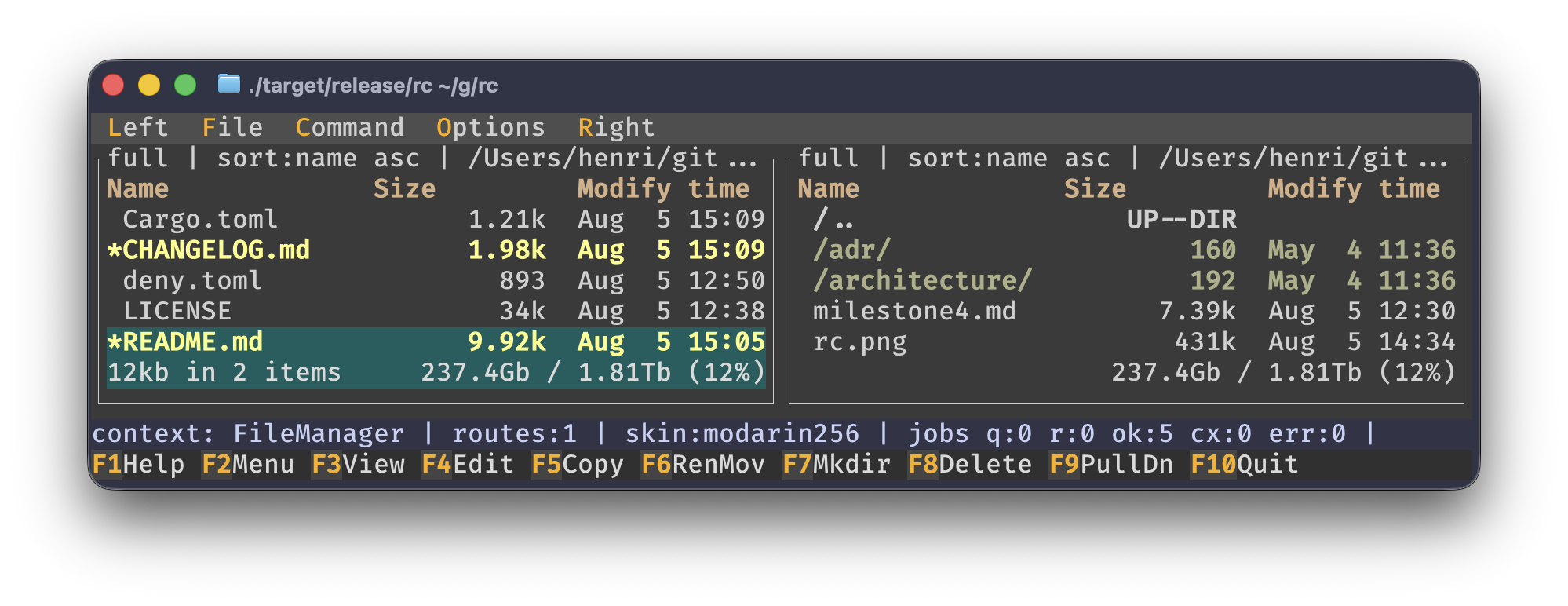
rust commander is a Rust terminal file manager inspired by GNU Midnight Commander. It keeps the familiar dual-pane workflow and MC-style default keybindings while adding responsive background operations, a modal shell prompt, and fast directory navigation.
- Two independent directory panels with Full, Brief, and Long layouts.
- Native filesystem notifications automatically refresh both panels and the open directory tree, including changes made by other programs. Updates are coalesced and scanned in the background while preserving selection and tags.
- Per-panel sorting, reverse order, glob or regular-expression filters, hidden-file control, and persisted configuration.
- Tagging for batch operations, recursive selection totals, responsive Brief-mode columns, and mouse selection or activation.
- Quick view and file information in the passive panel.
- Quick CD for exact paths,
~, Unix~user,cd -, and ranked case-insensitive directory search. - Directory tree navigation with static or dynamic movement, incremental search, subtree rescan, and subtree forgetting.
- A labeled, persistent directory hotlist with add, edit, remove, and quick-add.
- Copy, move, rename, mkdir, and delete for individual or tagged entries.
- Background execution with progress, cancellation, overwrite policies, and a jobs screen.
- Metadata preservation, symlink-aware operations, validation against recursive destinations, and rollback when an overwrite fails.
- Incremental, cancelable directory refreshes that preserve selection and tags.
Automatic refresh uses FSEvents on macOS, inotify on Linux, and ReadDirectoryChangesW on Windows. Watches are shared across directory aliases; the tree only refreshes affected cached subtrees. Native notifications may be unavailable on network or virtual filesystems; use manual refresh there. Watch registration failures are reported in the status line and retried in the background. Writes to the active tracing log are excluded from automatic invalidations so refresh logging cannot trigger another refresh. Log creation, deletion, and renaming still update the panels.
- Filename search with shell patterns or regular expressions.
- Optional content search, whole-word matching, ignored directories, pause, cancellation, and bounded partial-result reporting.
- Find results can be opened directly or placed into a panel.
- External panelize streams command output into a virtual panel and supports named, persistent presets and per-panel result history.
- Internal text and hex viewer with syntax highlighting, search in both directions, goto, wrapping, and bounded previews for large files.
- External editing through a configured command,
$EDITOR,$VISUAL, or detected editors (hx,nvim,vim,vi,emacs). - Executables run in the terminal; documents open with the operating system's configured application and fall back to the internal viewer when needed.
- Terminal state is restored around foreground programs and after fatal errors.
>opens a modal prompt in the active panel directory.- Fish-aware or generic completion, live prefix filtering, bounded history, and draft preservation.
- Successful literal
cdcommands refresh and synchronize the active panel. Alt-Enter/Ctrl-Enterinserts the selected name,Ctrl-Shift-Enterinserts its full path, andCtrl-X t/Ctrl-X Ctrl-Tinserts tagged names from either panel.- Panel-derived arguments are quoted literally for the configured shell.
- The bottom hint bar switches to prompt actions, and
F1opens contextual command-line help without discarding the draft.
- MC-style top menus, contextual help, mouse support, and a parsed
mc.default.keymapwith user overrides. - Bundled MC skins plus custom and system skin discovery.
- Typed settings for layout, panels, confirmations, appearance, display, shell, and command history.
- Atomic settings persistence and terminal-safe tracing.
Requirements:
- Rust 1.88.0 or newer
- A terminal with ANSI support
Install from crates.io:
cargo install rust-commander --lockedThe package is named rust-commander; the installed executable is rc.
Run a local checkout with:
cargo run -p rust-commander --lockedUseful launch options:
rc --path /some/start/dir --tick-rate-ms 200
rc --skin modarin256
rc --skin julia256 --skin-dir /path/to/mc/skinsThe Options menu configures layout, panels, confirmations, appearance, display, and setup persistence.
Settings use this precedence:
built-in defaults -> persisted configuration -> environment -> CLI
Save setup writes rc-owned settings to ~/.config/rc/settings.ini and the
MC-compatible skin choice to ~/.config/mc/ini.
Runtime tracing is written to ~/.config/rc/rc.log. Set RC_LOG_FILE to use
another path and RUST_LOG to change the default warn filter. The log is
kept away from the terminal so diagnostics cannot corrupt the alternate-screen
interface.
| Keys | Action |
|---|---|
Tab |
Switch active panel |
Enter |
Enter a directory, run an executable, or open a document |
Backspace |
Go to the parent directory |
Space / Insert / Ctrl-T |
Toggle the selected entry |
/ / Alt-C |
Open Quick CD |
> |
Open the Unix command line |
F3 |
View the selected file internally |
F4 |
Edit with the configured external editor |
F5 / F6 / F7 / F8 |
Copy / move or rename / mkdir / delete |
Ctrl-J / Alt-J |
Open jobs / cancel the latest or selected job |
Alt-F / Alt-? / Ctrl-/ |
Find files |
Alt-T |
Open the directory tree |
Alt-H |
Open the directory hotlist |
Alt-P / Ctrl-P / Ctrl-X ! |
Open external panelize |
Ctrl-X i / Ctrl-X q |
Show Info / Quick view in the passive panel |
Ctrl-X y |
Copy the active selected entry's full path to the clipboard |
Alt-Shift-T |
Cycle Full, Brief, and Long panel layouts |
Shift-F6 / Shift-F8 |
Cycle sort field / reverse sort order |
F9 |
Open the menu bar |
q / Esc / F10 |
Quit |
Left-click an entry in either pane to select it and make that pane active. Double-click to open the entry.
| Keys | Action |
|---|---|
Tab / Shift-Tab |
Complete and cycle candidates |
Up / Down |
Browse command history |
Enter |
Accept a completion or run the command |
Alt-Enter / Ctrl-Enter |
Insert the active panel's selected name |
Ctrl-Shift-Enter |
Insert the selected entry's full path |
Ctrl-X t |
Insert active-panel tagged names, or its selected name |
Ctrl-X Ctrl-T |
Insert passive-panel tagged names, or its selected name |
Ctrl-X y |
Copy the active selected entry's full path to the clipboard |
F1 |
Open command-line help |
Esc |
Return to the panels while preserving the draft |
- Find results:
F4searches again,F5panelizes,F6pauses or continues, andAlt-Jcancels the search. - Tree: arrows navigate;
F2rescans,F3forgets a subtree,F4changes navigation mode, andF5–F8perform file operations. - Hotlist:
aadds,e/F4edits,d/Deleteremoves, andEnteropens. - Panelize presets:
Tabselects custom input,F2adds,F4edits,F8removes, andEnterruns.
| Keys | Action |
|---|---|
F7 / Ctrl-S |
Search forward |
Shift-F7 |
Search backward |
n / Shift-N |
Continue forward / backward |
g / Alt-L |
Go to a line or offset |
w |
Toggle wrapping |
h |
Toggle text / hex mode |
Esc / q / F10 |
Close |
Default bindings live in
crates/core/assets/mc.default.keymap. Common macOS Option-symbol variants are
normalized before keymap matching.
The modal command line is available on Unix. Foreground commands receive their
own terminal process group so Ctrl-C interrupts the command without terminating
rc. Windows foreground programs retain normal console interrupt behavior while rc
temporarily handles control events in the parent.
Linux desktop opens prefer the desktop portal. Accepted legacy launchers are reaped independently and are not terminated when rc exits.
Clipboard copying uses the OSC 52 terminal sequence. The terminal emulator and any intermediate multiplexer must allow OSC 52 clipboard writes.
crates/app(rust-commander): terminal lifecycle, event loop, and input normalizationcrates/core(rust-commander-core): state, commands, routes, jobs, and filesystem workflowscrates/platform(rust-commander-platform): platform-specific terminal and process integrationcrates/ui(rust-commander-ui): Ratatui rendering and skin supportcrates/shell(rust-commander-shell): shell selection, completion, and cancelable process primitives- ROADMAP.md: remaining product work
With cargo-nextest installed, run the same baseline checks used by CI:
cargo fmt --all -- --check
cargo clippy --workspace --all-targets --all-features --locked -- -D warnings
cargo nextest run --workspace --all-targets --all-features --locked
Security, dependency-policy, coverage, and release-package checks live in
scripts/ and .github/workflows/.
GPL-3.0-or-later, as the project derives from Midnight Commander. See LICENSE for the complete terms.