
Free 3D asset generator for coding agents. Your agent writes TypeScript; ts23d compiles it to game-ready glTF — for Unity, Unreal, Godot, three.js, Babylon, or anything that reads glTF.


Use the LLM you already pay for to write the assets your project needs (vehicles, buildings, props, whole streets), optimised by construction. ts23d ends at the GLB, its textures and a manifest. The engine is yours.
Each asset is a TypeScript module. t3d build compiles it, deterministically, to GLB. Free: no GPU, no credits, no service. Browse the asset gallery: every recipe, compiled in your browser, with its source.
- Named, pivoted, animatable parts.
turret,gun,road_wheel_l_0: your engine code binds to node names. - Families. One typed build, many assets:
family.variant({ name, params })turns T-34 1941 into 1943 with one key;extendderives new families. Plain functions all the way down, no plugin API. - Sockets and surfaces.
ctx.socketexports seats, mounts, cameras and spawn points as named nodes. A part can beopaque,cutout,glassortranslucent; a GLB holds at most 4 materials over one texture set (a shampoo bottle is 2 draw calls). - Emitters and motion.
ctx.emitterexports smoke, steam, dust, muzzle and fire sources as named nodes your engine's particles bind to; partsspin,slideorsway. - 3 LODs from one source. The recipe reads
ctx.lodand drops detail. Nothing is decimated. - One shared material, batched geometry. Every asset maps into one trim sheet, and the exporter merges static geometry into its nearest pivot. Draw calls = the parts an engine moves: a static prop or building is 1; a tank with independently spinning road wheels is one per wheel plus turret, gun and hull.
- A QA gate. Exit 1 on: a part not in surface contact with anything grounded (2 cm), a moving part that cuts through another anywhere in its motion, a blown triangle budget.
- Code-level checks. The recipe states its physical intent and QA enforces it at every LOD:
checks: [clear('track_*', 'hull_*'), noOverlap('road_wheel_l_*'), touches('turret_body', 'hull_top'), symmetric('_l', '_r', 'y')]. "The track hits the frame" becomes a failing build. - Textures from code. A procedural albedo / normal / ORM trim sheet (bricks, planks, plates, slate, foliage), written once and shared by every GLB, plus three.js TSL and Godot shader sources.
- Spec-sheet fidelity. Declare
real: { length, width, height, measures }withsources. QA holds the overall size to ±5% and each named dimension (driver diameter, gauge, wheelbase) to ±2%. Fix the model, never the spec. - A contact sheet. One PNG, six labelled orthographic views on a metre grid, rendered on the CPU. A vision-capable agent reads it once, sees what's wrong and fixes it.
The goal: high-definition detail up close, cheap to draw everywhere. One texture set, batched static geometry, LODs, compact core-glTF buffers (u16 indices and colours), and (planned) welded, cache-optimised meshes.
No Blender for most hard-surface asset production. For vehicles, buildings, props and whole scenes, the LLM writes TypeScript that does the modelling, LODs, UVs onto the trim sheet, batching, QA and export. Blender stays useful for organic sculpting, which comes in through the planned /neural adapter or importGlb.
bun add @developerz-ai/ts23dThen give your agent the loop:
| Agent | Copy into your project |
|---|---|
| Claude Code | cp -r node_modules/@developerz-ai/ts23d/.claude/skills/author-recipe .claude/skills/ (the loop) and .claude/commands/new-recipe.md (the /new-recipe command), both shipped in the package |
| Codex, others | Point your AGENTS.md at node_modules/@developerz-ai/ts23d/AGENTS.md and …/docs/ (details) |
/new-recipe Tiger I, mid-production 1943, fully stowed
/new-recipe 4-4-0 steam loco with tender, wheels and rods animated on a loop
/new-recipe 1940s city street with townhouses and gas lamps (townhouse, lamp, street recipes: landing)
The agent looks up real dimensions, writes recipes/<name>.ts, builds until QA PASS, reads the contact sheet, and fixes the worst thing until two shots in a row find nothing (the loop).
out/<asset>/lod0.glb (and lod1, lod2) are plain glTF 2.0, core extensions only. The hooks your engine code can use:
| Hook | In the GLB |
|---|---|
| Movable parts | Named nodes with pivots at the hinge: turret, gun, wheel_*, door_* |
| Attachment points | Socket nodes with extras.ts23d.socket (seat, mount, camera, …) |
| Particle sources | Emitter nodes with extras.ts23d.emitter (smoke, steam, dust, muzzle, …) |
| Baked loop | Clip run (after a static rest clip) when built with t3d build |
| Everything else | out/<asset>/manifest.json: pivots, sockets, emitters, triangles, draw calls |
three.js, as an example:
const gltf = await new GLTFLoader().loadAsync('out/t34/lod0.glb');
const turret = gltf.scene.getObjectByName('turret');      // rotate about its local Z
const run = THREE.AnimationClip.findByName(gltf.animations, 'run');
const emitters = [];
gltf.scene.traverse((o) => o.userData.ts23d?.emitter && emitters.push(o));
Godot: node names import unchanged, and extras are available as node metadata when that import option is on. Unity (glTFast), Unreal and Babylon read the same names. ts23d ships no engine code; per-engine notes are in glb-production.md.
Each ts23d row names how it's verified. The image-to-3D column cites only what vendors' own pages state, as collected in docs/landscape.md (as of Oct 2026). Image-to-3D is the better tool for organic and sculpted shapes; for those, see the planned /neural adapter.
| Property | ts23d | How it's verified | Typical image-to-3D output (per vendor docs) |
|---|---|---|---|
| Draw calls per asset | Static assets: 1. Vehicles: one per movable part (one shared material; static geometry batched into its pivot) | toGlb merges static parts by default (mergeToPivots); counts measured by bun run bench |
One PBR material per generated model (e.g. Meshy: albedo / normal / metal / rough) |
| LODs | 3 from the same source | t3d build writes lod0/1/2, each under its own triangle budget |
One mesh per generation; polycount presets or a low-poly mode (Rodin, Meshy) |
| Named, pivoted, animatable parts | Yes | part-names gate; clashes gate sweeps every moving part |
Usually one mesh; part-based output reported for CSM (3rd-party source) |
| Deterministic rebuild | Byte-identical | scripts/recipes.ts builds every recipe twice and compares hashes, in CI |
Not stated |
| Real-world dimensions | Gated: ±5% overall, ±2% per measure | proportions and measures gates |
Not stated |
| Parts that float or clash | Gated | floating-parts (surface contact, 2 cm), clashes (1 cm) |
Not stated |
| Cost per asset or variant | $0 | MIT, runs locally, a variant is a new seed | Credits, e.g. Meshy ~20–25 credits per generation; Rodin $1.50/credit pay-per-result |
| GPU needed | No | CPU compile and CPU contact sheet | Hosted: no. Self-hosted open weights: yes (TRELLIS.2 ≥ 24 GB) |
| Editable by an LLM | A TypeScript diff | Code review, bun run verify |
A binary mesh; edit by regenerating or in a DCC tool |
| Repair / retopo step | None: authored with pivots, units and budgets | QA gates fail the build instead | Remesh / retopology tools offered (Meshy Smart Topology, quad remesh; CSM AI retopology, 3rd-party) |
| Texture memory per asset | Shares one trim sheet: with --sheet external every GLB references the same three PNGs |
out/trim_sheet_*.png written once per build |
Own texture set per asset, up to 4K (TRELLIS.2) |
To be measured: bun run bench --write fills the block below (triangles per LOD, compile + QA time, GLB size, parts, draw calls per gallery recipe) from real runs. Nothing in it is typed by hand; empty means not yet run.
Measured by bun run bench on 1.4.3 (Bun).
| asset | tris LOD0 / 1 / 2 | GLB KiB LOD0 / 1 / 2 | parts | animated | draw calls (1 material) | compile + QA, 3 LODs | QA |
|---|---|---|---|---|---|---|---|
eiffel_tower |
188016 / 21860 / 1062 | 16863 / 1819 / 85 | 28 | 0 | 1 | 1543 ms | PASS |
loco_440 |
23868 / 13552 / 1400 | 1035 / 614 / 104 | 80 | 14 | 17 | 521 ms | PASS |
material_swatches |
10926 / 226 / 226 | 921 / 23 / 23 | 52 | 0 | 3 | 71 ms | PASS |
oak |
12408 / 2536 / 180 | 649 / 135 / 8 | 5 | 1 | 2 | 297 ms | PASS |
palm |
5032 / 1986 / 211 | 371 / 174 / 19 | 5 | 1 | 2 | 103 ms | PASS |
pine |
6496 / 1212 / 180 | 322 / 64 / 8 | 5 | 1 | 2 | 95 ms | PASS |
t34 |
36452 / 9960 / 556 | 1761 / 415 / 35 | 28 | 16 | 17 | 360 ms | PASS |
t34_1941 |
35060 / 9460 / 500 | 1694 / 391 / 33 | 28 | 16 | 17 | 315 ms | PASS |
tiger_1 |
88176 / 16304 / 648 | 10709 / 1975 / 41 | 37 | 22 | 23 | 1827 ms | PASS |
Draw calls column: static assets (the Eiffel Tower) are 1; vehicles are one per movable part. Trim-sheet painting: 512² ≈ 0.22 s, 1024² ≈ 0.8 s, 2048² ≈ 2.95 s. The predecessor's reference loco (below) is about 16k triangles at LOD0.
Asset production needs nothing else between "describe the asset" and "a GLB your engine imports". Honest status per stage:
| Stage | Module | Status (2026-10) | Replaces |
|---|---|---|---|
| Geometry | primitives, kinds |
Shipped: box, lathe, prism, beam, planar, sweep, loft, heightfield, facades, vehicles, Weber–Penn trees. Planned: sdf, roofs, hulls, creatures |
Blender modelling |
| Materials and textures | material (generator) |
Shipped: procedural albedo / normal / ORM trim sheet, embedded or shared PNGs, palettes, grime. No KTX2 yet |
Substance / texture tools |
| Optimisation | passes/optimize, export |
Shipped: u16 indices, u16 colours, batching. Planned, M2: weld, vertex-cache reorder, ACMR; opt-in web profile (quantisation + meshopt) |
meshoptimizer / gltfpack |
| LODs | ctx.lod |
Shipped | Decimators |
| QA | qa |
Shipped: budget, surface-contact floating parts, motion clashes, names, proportions, spec measures. Silhouette IoU and ACMR planned | Manual review |
| Renders and photo match | render |
Contact sheet shipped. Photo match planned, M2 | — |
| GLB export | export |
Shipped: core glTF only, faces +Z, seamless loops, trim-sheet textures, 0 glTF-Validator errors (tested) | — |
| Engine import adapters | threeMaterialSource (TSL), godotShaderSource |
Shipped: shader sources with wind, window glow, wear. Planned, M3: import settings and collision naming per engine, as hooks, not runtime | — |
Every stage has zero runtime dependencies (ADR 005).
Status: early (0.x). The core loop works: write, build, QA, shot, with textures, trees and nine passing recipes. Still declared and throwing
T3D_NOT_IMPLEMENTED:tiled,cell,sdf, roofs, hulls, creatures, photo match, meshoptimize, neural adapters. See the roadmap. Expect breaking changes.
import { axle, box, defineAsset, palettes } from '@developerz-ai/ts23d';

const { paint, iron, trim } = palettes.victorianRail;

export const handcart = defineAsset({
  name: 'handcart',
  kind: 'vehicle',
  budget: { triangles: [2000, 800, 300] }, // LOD0 / LOD1 / LOD2 ceilings, enforced by QA
  build(ctx) {
    for (const [i, x] of [0.8, -0.8].entries()) {
      axle(ctx, { name: `axle_${i}`, at: [x, 0, 0.35], radius: 0.35, gauge: 1.2,
                  width: 0.08, color: iron, rps: 1 }); // wheels spin in the baked clip
    }
    ctx.part('bed', box({ size: [2.4, 1.3, 0.12], at: [0, 0, 0.62], color: trim, strip: 'wood' }));
    const posts = ctx.lod === 2 ? 2 : 6; // LOD drops detail; it never decimates
    for (let i = 0; i < posts; i++) {
      const x = -1.1 + (2.2 * i) / (posts - 1);
      ctx.part(`post_${i}`, box({ size: [0.08, 0.08, 0.5], at: [x, 0.6, 0.74], color: paint }));
    }
  },
});
Metres, Z up, +X is the front. Loops, functions and types, because a recipe is code, not data (why).
t3d shot recipes/tiger_1.ts → out/tiger_1/sheet.png, from recipes/tiger_1.ts. CI publishes every recipe's sheet to the gallery under /renders/:
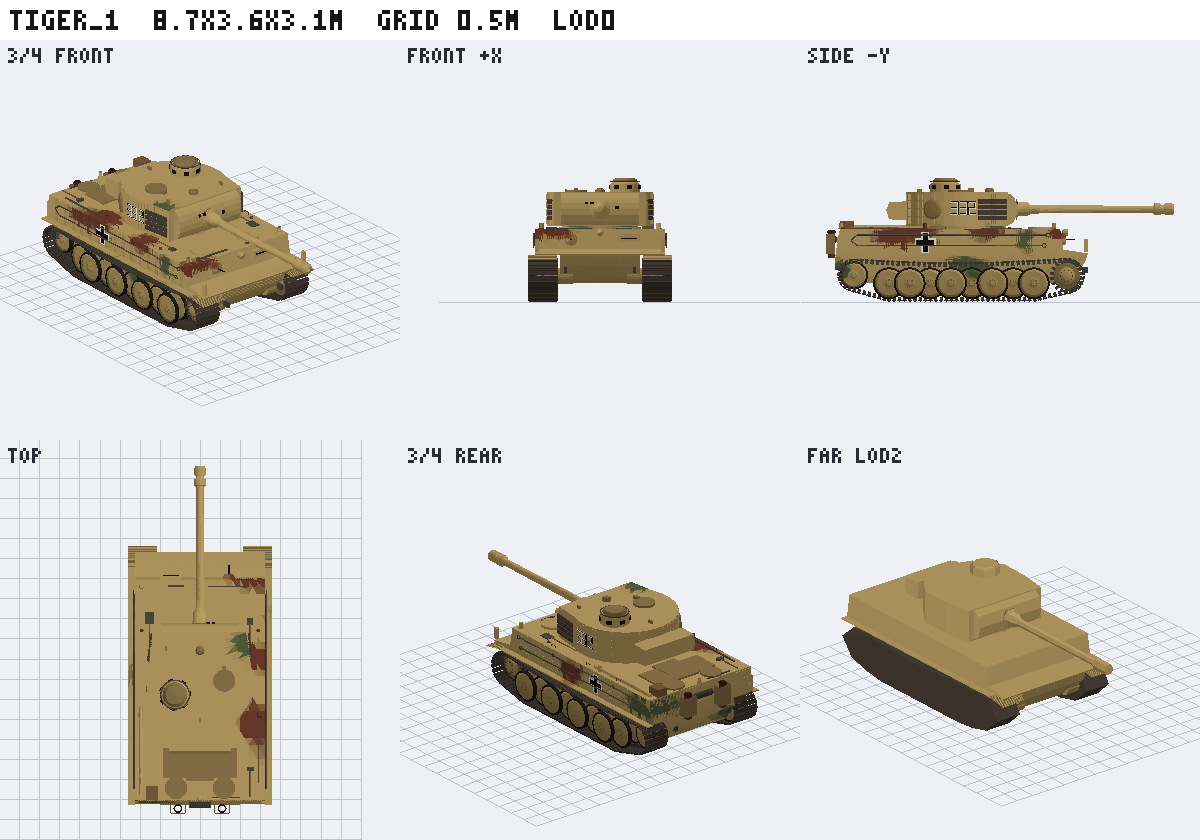
Header: name, bounding box in metres, grid step, LOD. Row 1: 3/4 front, front (+X), side (−Y). Row 2: top, 3/4 rear, LOD2 at distance. Layout: docs/idea/05-agent-loop.md.
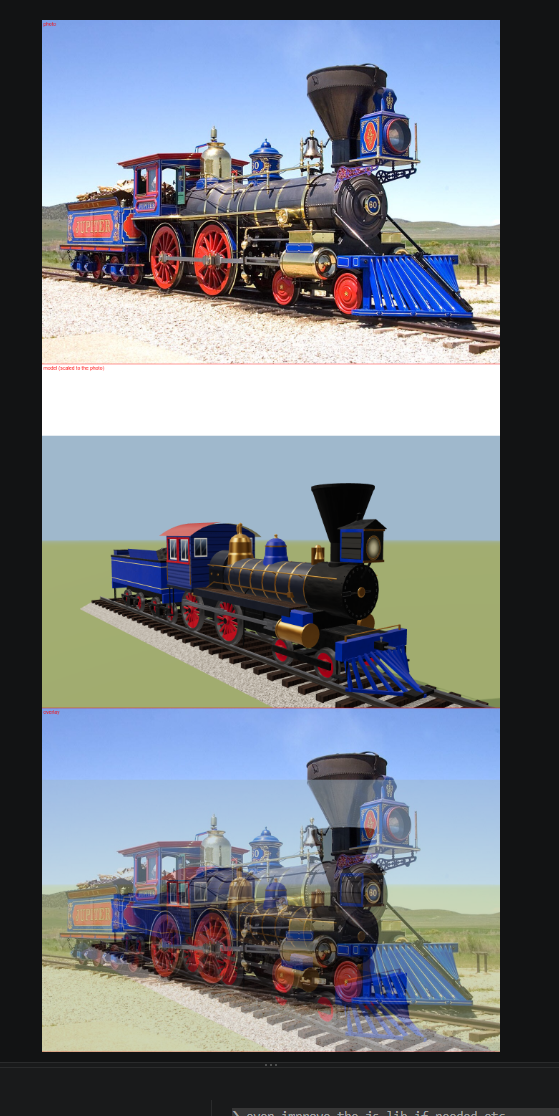
Not output of this library yet. This is from the in-house predecessor (a JSON recipe compiler for railroads): a 4-4-0 with tender. Top: reference photo. Middle: the procedural model. Bottom: overlay. That GLB is ~16k triangles, 17 named nodes (axles, side and main rods, crossheads, tender axles, track), one trim_sheet material with embedded albedo / normal / ORM textures, and a baked run animation. ts23d now has its own loco_440 (the Jupiter, drivers 1.626 m sourced) and the trim-sheet painter; photo match is next (M2, roadmap).
Needs Bun ≥ 1.4.4 (Node ≥ 22 for the compiled dist/).
bun add @developerz-ai/ts23d
bunx t3d build recipes/*.ts         # GLB × 3 LODs + sheet + manifest per asset; exit 1 on a QA finding
bunx t3d shot  recipes/*.ts         # sheet + manifest only: the fast look
bunx t3d list recipes/*.ts --json # the assets each module exports| Flag | Effect |
|---|---|
--out <dir> |
Output directory (default out) |
--no-shot |
build without rendering the contact sheet |
--sheet external|embed|none |
Trim-sheet textures. external (default): out/trim_sheet_{albedo,normal,orm}.png written once, every GLB references ../trim_sheet_*.png. embed: inside each GLB. none: vertex colour only |
--sheet-size 512|1024|2048 |
Sheet resolution (default 1024) |
--lods 0,1,2 |
Which detail levels to build (default all three). --lods 0 = hero mesh only, --lods 0,2 = near + far. QA and the manifest cover exactly what was built |
--no-animations |
Skip the baked run clip. t3d build bakes it by default so viewers (e.g. VS Code glTF Tools) show play controls |
--json |
Machine-readable { ok, data } / { ok: false, error: { code, message, fix } } |
Output, one folder per asset (stable paths for agents and pipelines):
out/
├── index.json              every asset built in this run, with its QA verdict
└── <asset>/
    ├── lod0.glb lod1.glb lod2.glb
    ├── sheet.png           the contact sheet
    └── manifest.json       files; triangles + draw calls per LOD; pivots, emitters, sockets,
                            surfaces; real + measures with measured values; sources; QA
Library calls differ on one default: toGlb(asset) exports no animation unless { animations: true }.
Every exported asset in a module is built (defineAsset or family.variant). Every error prints a stable T3D_* code and its fix (errors).
t3d is a convenience. Everything it does is a function call: compile, QA, export, render.
A plain script builds exactly what you want, and the same code runs in Node ≥ 22 (against the
built dist/), in a browser, or in a Web Worker (the asset gallery
compiles every recipe in a worker).
// build.ts → bun build.ts
import { compile, contactSheet, DEFAULT_SHEET, paintTrimSheet, runQa, toGlb } from '@developerz-ai/ts23d';
import { tiger_1 } from './recipes/tiger_1.ts';

const sheet = paintTrimSheet({ ...DEFAULT_SHEET, size: 512 }); // textures are optional

for (const lod of [0, 2] as const) {                // only the detail levels you need
  const asset = compile(tiger_1, { lod });
  const findings = runQa(asset);                    // gate it your way, or skip it
  if (findings.length) throw new Error(findings.map((f) => `${f.message} — fix: ${f.fix}`).join('\n'));
  await Bun.write(`out/tiger_1.lod${lod}.glb`, toGlb(asset, { sheet, animations: true }));
}
await Bun.write('out/tiger_1.png', contactSheet(compile(tiger_1, { lod: 0 }))); // for your agent's eyes
Runnable copy: examples/build-with-bun.ts — executed in CI, so this path can't rot.
| Building block | What it gives you |
|---|---|
compile(asset, { lod, seed }) |
the compiled parts for one LOD (deterministic) |
runQa(compiled) / single gates / inspect(compiled) |
findings with fixes; geometry queries for your own checks |
toGlb(compiled, { sheet, animations, keepParts }) |
GLB bytes (Uint8Array) — write them anywhere |
mergeToPivots(compiled) |
the batched part list the GLB uses (draw calls = movable parts) |
contactSheet(compiled, { far, cell }) |
six-view PNG bytes |
paintTrimSheet(recipe) + sheetPngs(sheet) |
the texture set (albedo / normal / ORM) as RGBA or PNG |
threeMaterialSource(hints) / godotShaderSource(hints) |
shader source strings for your engine |
manifest data |
build it from compiled.parts (pivots, emitters, sockets) — see src/cli/manifest.ts |
The docs ship inside the package, versioned with the code, readable offline. After bun add, everything an agent needs is at node_modules/@developerz-ai/ts23d/: AGENTS.md, CLAUDE.md, llms.txt, docs/, recipes/ (worked examples), CHANGELOG.md and .claude/{skills,agents,commands}.
Point your agent at them. Add to your project's CLAUDE.md or AGENTS.md:
3D assets: @developerz-ai/ts23d. Read node_modules/@developerz-ai/ts23d/AGENTS.md first;
docs in node_modules/@developerz-ai/ts23d/docs/, example recipes in …/recipes/.
Claude Code skill (and the /new-recipe command):
mkdir -p .claude/skills .claude/commands
cp -r node_modules/@developerz-ai/ts23d/.claude/skills/author-recipe .claude/skills/
cp node_modules/@developerz-ai/ts23d/.claude/commands/new-recipe.md .claude/commands/
Works with any agent that writes TypeScript and can run a shell: Claude Code, Codex, Cursor, Aider, a local model. If it can read images, it closes the loop on its own. No skill files? Paste this:
Using @developerz-ai/ts23d, write recipes/<name>.ts: a <thing>, real dimensions in metres,
Z up, +X front. Put the sources in `sources` and the key dimensions in `real.measures`.
Block out the masses, then details. Name every part that moves (axle_*, door_*, rotor_*)
and pivot it where it hinges. Loop until done:
  1. bunx t3d build recipes/<name>.ts   (fix every finding until it prints QA PASS;
     a measures finding means rebuild the part, never edit the spec)
  2. Read out/<name>/sheet.png (build writes it).
  3. Name the single biggest error, fix it, go to 1.
Stop when two consecutive shots show nothing worth fixing. Never use Math.random; use ctx.rng.
As of 2026-10. Full matrix: docs/idea/07-what-fits.md.
| Fit | Asset categories |
|---|---|
| Strong | Hard-surface props, architecture (facades, towers), vehicles (tracked, wheeled, rail), modular kits, anything with real dimensions or repeated parts |
| Shipped, early | Vegetation: Weber–Penn trees (oak, pine, palm, birch, willow); LOD2 impostors are crude |
| Planned | Boats (lofted hulls, M2), stylised creatures (SDF over a skeleton, M4) |
| Weak | Realistic people and animals, sculpted organic forms, cloth. Use an image-to-3D tool, or the planned /neural adapter that runs open-weight models on your own GPU and caches the result |
Not a replacement for AI mesh generators: a different approach with different strengths. Neutral comparison: docs/landscape.md.
Every recipe in recipes/, compiled in the browser, with source and LOD switcher: https://developerz-ai.github.io/ts23d/. Recipes today: tiger_1, t34 + t34_1941 (a family), loco_440 (a 4-4-0, the Jupiter, family), eiffel_tower, oak, pine, palm, material_swatches.
| Read | For |
|---|---|
| docs/README.md | The index |
| docs/idea/ | Vision, DSL, IR, materials, agent loop, QA, kinds |
| docs/decisions/ | Why: ADRs with the rejected options |
| docs/architecture/ | Module tiers, adding a primitive or kind, error codes |
| docs/plans/roadmap.md | M0–M6 |
| CONTRIBUTING.md | bun run setup, bun run verify |
| kubeez.com | Partner. Generate reference and concept images, decals and texture source images. The sheet painter's image-stamped cells will consume them (planned) (materials) |
| developerz.ai | 100% AI-managed software engineering. ts23d is built and maintained by AI agents |
MIT. Outputs are yours: no attribution, no licence conditions on generated assets.