


Draw shapes, text and animations in a terminal's character grid with ANSI colours. Zero dependencies, 100% Rust.
It works on cells: each cell holds one character, a foreground colour and a background colour, and you draw into an in-memory grid that is printed in place. It is not an image protocol (Kitty, Sixel, iTerm2) and not a widget toolkit; for those, look elsewhere.
Try it in your browser: play a Snake game built with this library
You need a Rust toolchain and a terminal that understands ANSI escape codes (Linux and macOS terminals do, as do recent Windows terminals; the library is aimed at Linux).
Add the crate to your project:
cargo add terminal_graphicsor add it to Cargo.toml yourself:
[dependencies]
terminal_graphics = "1"git clone https://github.com/calum/terminal_graphics_api
cd terminal_graphics_api
cargo run --example demoThe demo is a ~10 second animated tour of the whole library: a custom Graphic (plasma) in a Container, bouncing Balls with contains in a Graphics collection, the 16-colour palette, from_rgb gradients, clipped scrolling Text, and live stats. Pass -- --frames N to change the length. Its source is in examples/demo.rs.
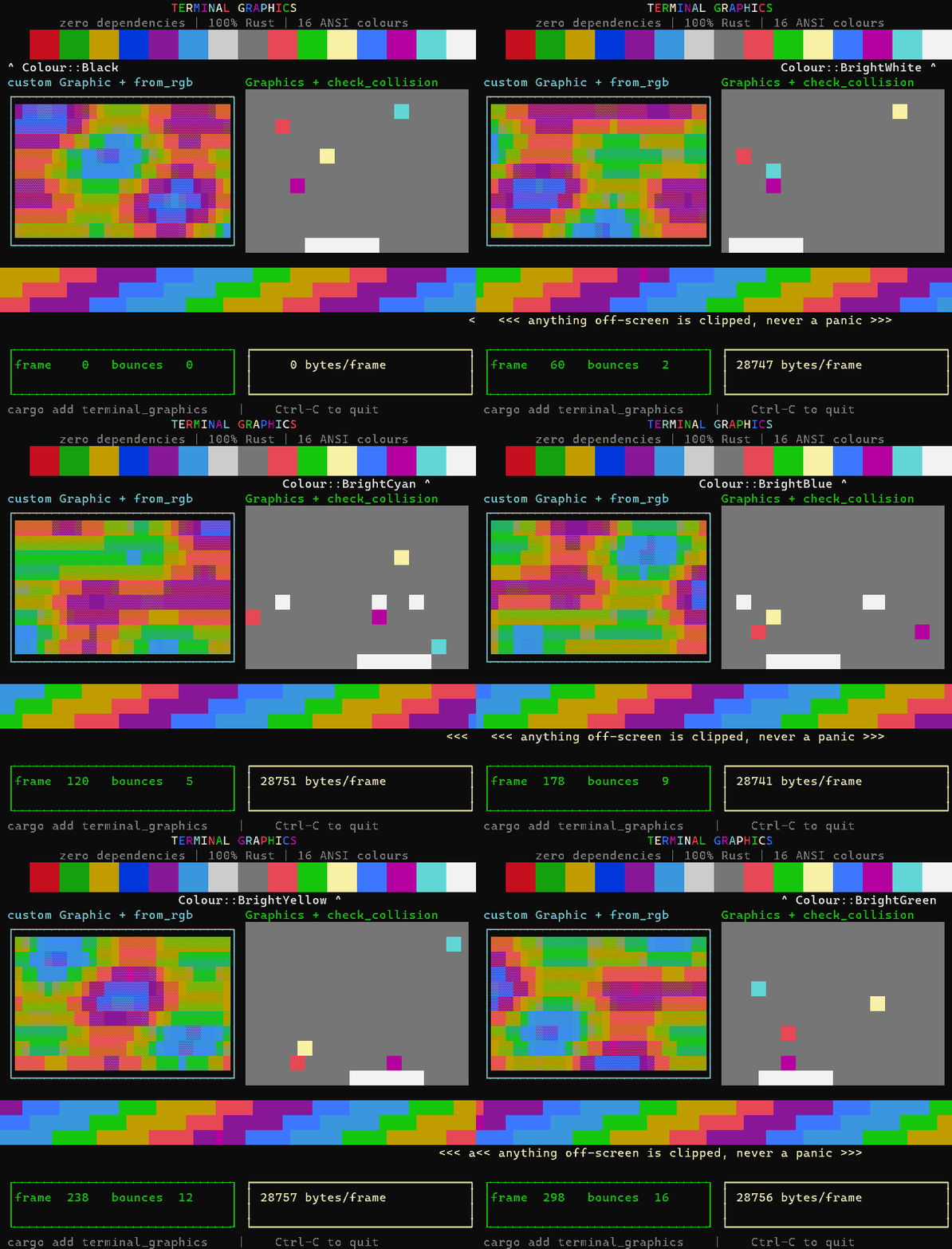
Everything is drawn into a Display, a grid of character cells held in memory. Draw things into it, then call print to show it. Coordinates are (x, y) from the top-left corner, and anything outside the display is clipped.
use terminal_graphics::{Colour, Container, Display, Graphic, Text};

fn main() -> std::io::Result<()> {
    // A 40 column by 10 row display.
    let mut display = Display::new(40, 10);

    // Reserve screen space: `print` moves the cursor up over the display
    // before drawing, so it needs 10 lines to draw on.
    display.reserve_space()?;

    // A 24x5 box at (x = 5, y = 2) with a green border and blue background,
    // holding some text. The text's position is relative to the inside of
    // the box, so (1, 1) is one cell in from the top-left of the interior.
    let container = Container::new(5, 2, 24, 5, Colour::BrightGreen, Colour::Blue)
        .with_content(Text::new(1, 1, "Hello, terminal!", Colour::BrightYellow, Colour::Blue));

    container.draw(&mut display);
    display.print()
}Keep your graphics in a Graphics collection under names. Each frame, advance them with update and call show, which clears the display, draws every graphic in the order it was added, and prints the result:
use std::{thread::sleep, time::Duration};
use terminal_graphics::prelude::*;

fn main() -> std::io::Result<()> {
    let mut display = Display::new(40, 8);
    let mut graphics = Graphics::new();
    graphics
        .add("sky", Rect::new(0, 0, 40, 8, Colour::Blue))
        .add("ball", Ball::new(0.0, 3.0, 1.0, 0.0, Colour::BrightYellow))
        .add("label", Text::new(1, 0, "A ball, moving right", Colour::White, Colour::Blue));

    display.reserve_space()?;
    for _ in 0..38 {
        graphics.update(); // moves every Ball by its speed
        graphics.show(&mut display)?;
        sleep(Duration::from_millis(50));
    }
    Ok(())
}
Use graphics.get_mut("ball") to change a graphic, graphics.move_by("label", 1, 0) to nudge one, and graphics.remove("ball") to take one away. Implement the Graphic trait to draw your own shapes; contains(x, y) tests a cell against a graphic, which is handy for collisions. use terminal_graphics::prelude::*; imports everything at once, and the API documentation covers each type.
This crate draws; it does not read input. To add keyboard and mouse events (clicks, drags, scrolling) for games, paint programs and other interactive programs, use the companion crate terminal_graphics_interactive. It builds on this one and re-exports it, so a single dependency is enough, and it works in Windows PowerShell, Linux, macOS and over SSH. It is early (0.1):
cargo add terminal_graphics_interactivecargo bench runs benches/render.rs, which uses only std. A frame is the cost of turning a Display into ANSI output. Colour codes are only sent when the colours change along a row, so uniform and slowly changing frames are small. Numbers from one machine (Windows 11, release build); yours will differ, so run it yourself:
| Frame (80x24) | Before | Now |
|---|---|---|
render, one colour |
83 us | 9 us |
render, 16-colour gradient |
196 us | 12 us |
| update + draw + write | 203 us | 17 us |
| output per frame | 29 KB | 2.5-3 KB |
At 200x60 a render takes 43-51 us and writes 14 KB (it was about 1.2 ms and 181 KB). A real terminal parses every byte you send, so the bytes per frame usually matter more than the CPU time.
Version 1.0 renamed and reshaped much of the API. See CHANGELOG.md for the full list and a before/after migration guide.
- crates.io: https://crates.io/crates/terminal_graphics
- API documentation: https://docs.rs/terminal_graphics
- Website (with a playable game): https://calum.github.io/terminal_graphics_api/
- Source: https://github.com/calum/terminal_graphics_api
- For AI coding agents: llms.txt
- Issues: https://github.com/calum/terminal_graphics_api/issues
For example applications, try termage or terminal_game_engine.
Licensed under either of MIT or Apache-2.0 at your option.