
Local browser UI for the pi coding agent. Pi Web uses the same local configuration and session files as pi, so you can browse and resume conversations, run agent turns, configure models and resources, and inspect project files from a browser.
Try the interactive demo → The real Pi Web UI runs entirely in your browser, with sample sessions, files and models. There is nothing to install; replies are pre-written and no model is called.
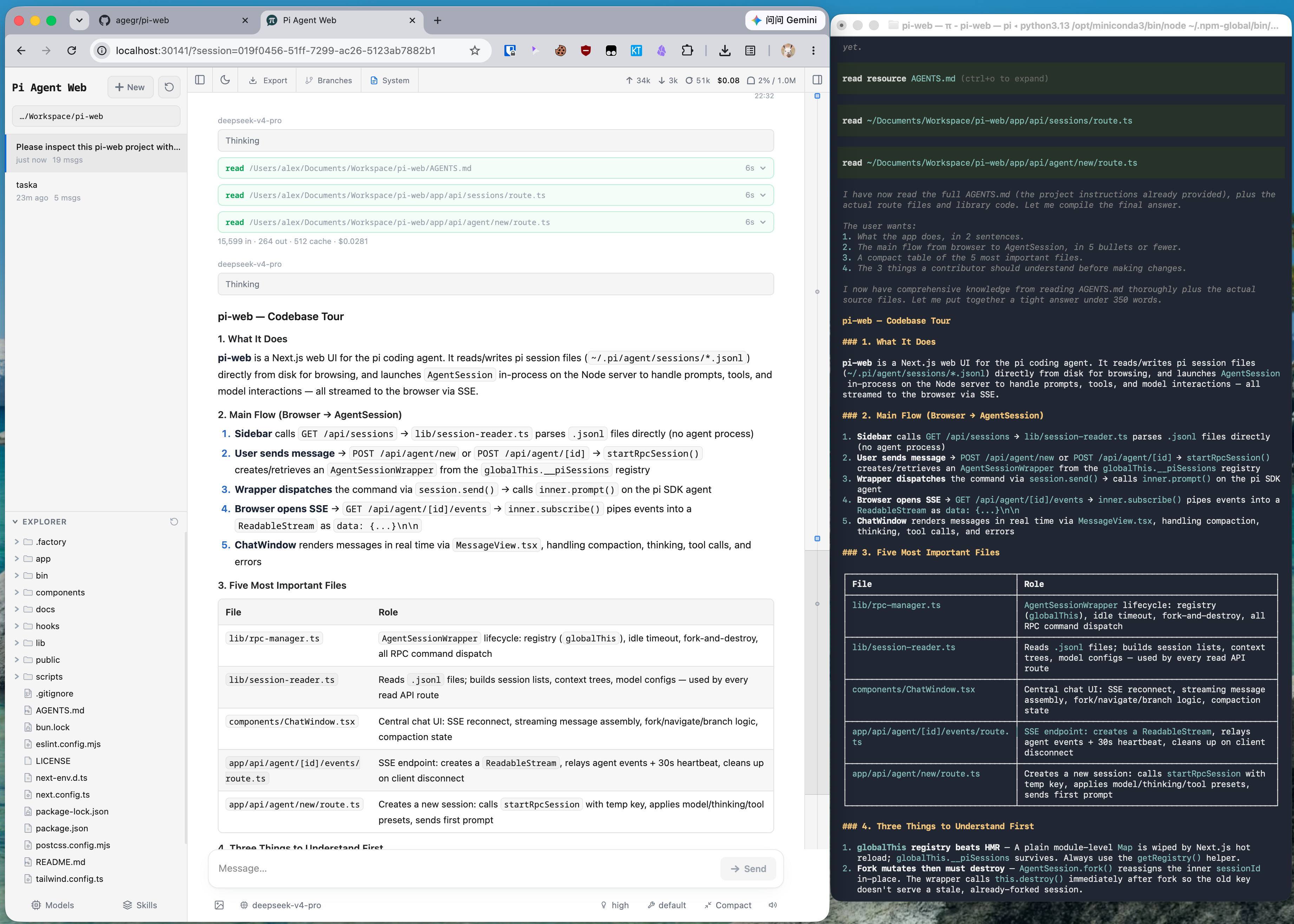
- Session workspace: browse, resume, rename, export, and delete conversations grouped by project, with running state, context usage, cost, and compaction details.
- Two ways to branch: New session creates an independent session file from an earlier message; Edit from here creates a branch inside the current session.
- Project file tools: browse and upload files, inspect Git diffs, and preview source, Markdown, images, audio, PDFs, and DOCX files with automatic refresh.
- Git worktrees: switch checkouts from the sidebar while keeping sessions from the same repository grouped together.
- Web-based configuration: manage provider login and API keys, models, model tests, plugin packages, and skills without leaving Pi Web.
- English, Simplified Chinese, and Traditional Chinese UI: Pi Web follows the browser language initially. Change it under Settings → General → Language.
Pi Web requires Node.js 22.19.0 or newer. Check your version with node --version, then run:
npx @agegr/pi-web@latestThe CLI opens a browser after the server is ready. If it does not, open http://127.0.0.1:30141. Pi Web listens only on 127.0.0.1 by default.
If no model provider is configured yet, open the Models panel to sign in or add an API key.
To install the pi-web command globally:
npm install -g @agegr/pi-web@latest
pi-web
Commands:
pi-web version          # print the installed version
pi-web status           # list running servers
pi-web stop [--port N]  # stop a running server
pi-web open [--port N]  # open a running server in the browser
pi-web update [--check] # update a global npm install
To update, run pi-web stop, then pi-web update (or run the same install command again). To uninstall, run npm uninstall -g @agegr/pi-web.
For port and hostname, command-line options override the corresponding environment variables. Either --no-open or PI_WEB_NO_OPEN=1 disables automatic browser opening. Run pi-web --help (or -h) to print startup options and exit without starting the server. Unknown options exit with an error.
| Option or environment variable | Purpose | Default |
|---|---|---|
--help, -h |
Print startup options and exit | — |
--port <port>, -p <port>, or PORT |
Server port | 30141 |
--hostname <host>, -H <host>, or PI_WEB_HOSTNAME |
Bind hostname | 127.0.0.1 |
--no-open or PI_WEB_NO_OPEN=1 |
Do not open a browser automatically | Browser opens |
PI_WEB_APP_NAME |
PWA manifest name and short_name; surrounding whitespace is trimmed, empty values use the default |
Pi Web |
PI_WEB_SKIP_VERSION_CHECK=1 |
Disable Pi Web update checks | Unset |
PI_WEB_ALLOWED_HOSTS |
Additional exact proxy or custom hostnames, comma-separated | Unset |
PI_WEB_PASSWORD |
Enable browser password login; API clients may use Basic Auth with username pi |
Authentication disabled |
PI_WEB_IDLE_TIMEOUT_MS |
Session idle timeout in milliseconds, up to 2147483647; 0 disables idle shutdown; invalid or out-of-range values use the default |
600000 (10 min) |
PI_WEB_SHUTDOWN_DEADLINE_MS |
How long extensions get to handle session_shutdown before a closing session is disposed anyway, in milliseconds up to 2147483647; 0, invalid or out-of-range values use the default |
5000 (5 s) |
PI_CODEMODE_MAX_WORKERS |
pi's limit on codemode scripts running at once, shared by every session and subagent in the server; pi's own default is 2, and pi-web sets 8 when the variable is unset or empty. Each script may use up to 256 MB |
8 |
Set PI_WEB_APP_NAME before starting the server (for example, PI_WEB_APP_NAME='Work Pi' pi-web). After changing it, restart the server to serve the new manifest; no rebuild is required. Updates to the name of an already installed PWA are managed by the browser and are not guaranteed to appear immediately. This does not change the page title or icons.
For example:
pi-web --help
pi-web -p 8080 -H 0.0.0.0 --no-openBinding to a non-loopback address exposes an agent that can execute high-privilege actions. On a trusted LAN, require a long random password:
PI_WEB_PASSWORD='a-long-random-password' pi-web --hostname 0.0.0.0Password authentication does not encrypt the connection. Do not expose Pi Web over plain HTTP to the internet; use HTTPS through a trusted reverse proxy or a trusted VPN. If a reverse proxy sends an external hostname, add that exact name to PI_WEB_ALLOWED_HOSTS. This allow-list does not change the address Pi Web binds to.
With many chats, terminals or file previews active at once, plain HTTP limits the browser to six connections and requests start to wait; see Serving Pi Web over HTTP/2.
Each release publishes an image to ghcr.io/agegr/pi-web. See Running Pi Web in Docker for it, the Compose example and which volumes to keep.
Server-side model and API requests honor the standard HTTP_PROXY, HTTPS_PROXY, and NO_PROXY environment variables.
On macOS or Linux:
HTTP_PROXY=http://127.0.0.1:7890 \
HTTPS_PROXY=http://127.0.0.1:7890 \
NO_PROXY=localhost,127.0.0.1 \
npx @agegr/pi-web@latest
On Windows PowerShell:
$env:HTTP_PROXY = "http://127.0.0.1:7890"
$env:HTTPS_PROXY = "http://127.0.0.1:7890"
$env:NO_PROXY = "localhost,127.0.0.1"
npx @agegr/pi-web@latest- Agent data: Pi Web reads pi data from
~/.pi/agentby default, including session files undersessions/<encoded-cwd>/<timestamp>_<uuid>.jsonl. SetPI_CODING_AGENT_DIRto use another pi agent directory. - Filesystem access: Pi Web must be able to read the agent data directory and the working directories recorded by its sessions. Run Pi Web in the same filesystem environment as pi when sharing existing sessions.
- Shared configuration: the Models panel uses pi's model, settings, and credential storage, so changes are visible to both interfaces. An open session applies a saved edit of its model when you select the model again.
- File access boundary: the file browser is limited to working directories selected in Pi Web and project or session roots it already knows about; it is not a general filesystem browser.
- Git worktrees: see Worktrees in Pi Web for switcher visibility, worktree creation, and removal behavior.
- Integration hooks: apps that embed Pi Web can replace the session row's context menu, and server-side pi extensions can keep a session from idle shutdown; see Integration Hooks.
npm install
npm run dev
The development server runs at http://127.0.0.1:30141. Run the common checks with:
npm test
node_modules/.bin/tsc --noEmit
npm run lint
Do not run next build or npm run build during normal development. It writes to .next/ and can interfere with the development server; leave builds for release work.
Before starting on a feature, read Contributing for what is in scope and the pull request checklist.
Contributor guides: Internationalization and Release process.
app/             Next.js UI and API routes
components/      React UI components
hooks/           Client state and interaction hooks
lib/             Session, agent, model, file, Git, and security logic
public/          Static assets and PWA files
bin/             npm CLI entrypoint and launch option parsing
docs/            Focused user and contributor guides
demo/            Static browser demo published to GitHub Pages (see demo/README.md)
See AGENTS.md for the architecture notes and detailed file map.