

A C++20 3D library you can take one layer at a time: draw with the GPU in a few lines, simulate a world without any screen, or build a full 3D scene like in Three.js. Each layer works without the ones above it.
Compages is a Latin word: an assembly of parts that lock together into one whole. Here, three layers: GPU, world and renderer.
A 3D program does two different jobs:
- Simulate: things exist and move. A robot arm turns its joints, particles fall, a character walks. This is numbers in memory: a unit test or a planner needs it, without any window.
- Show: a camera looks at this world and the graphics card draws it, sixty times per second.
Most 3D engines mix the two and give you everything at once: a window, an editor, a scene format, a physics engine. You wanted to draw a curve, and you got a game engine. Compages does the opposite. It is three stacked layers, and you stop at the first one that does your job:
| Layer | When you have… | You write… | Inspired by |
|---|---|---|---|
| 🟧 GPU | a shader and arrays of numbers | drawable["position"] = list_of_points; drawable.draw(); |
Glumpy |
| 🟦 World | things that move, even with no screen | world.entity("Ship").child("Gun"), your structs as components |
Three.js + an ECS |
| 🟩 Renderer | a world you want to see | scene.box("Cube", color(1, 0, 0)); scene.draw(frame); |
Three.js |
- 🌌 A galaxy simulated on the GPU needs only the GPU layer.
- 🤖 A robot planner, a server or a unit test needs only the World layer: no OpenGL context at all.
- 🎮 A game or a robot simulator uses the three, and the types stay separate.
It started with SimTaDyn, as student project, where I wanted to draw maps. I needed an OpenGL layer.
With the old OpenGL (the "legacy" one, glBegin / glEnd), drawing was simple. Then OpenGL 3.3 core arrived: buffers, vertex arrays, attribute locations, shaders to compile and link, uniforms to look up by hand… dozens of calls before the first triangle, and one wrong call gives a black window with no message. I never managed to get it right.
Then I found Glumpy, in Python, and it was a revelation: the shader names its data, you fill program["position"], you call draw(), and the copies between the CPU and the GPU are hidden. A whole OpenGL application in a few lines. I wrote a C++ version of this idea: OpenGLCppWrapper. But it hit walls:
- 🔁 No ping-pong. GPU simulations draw into a texture, then read it in the next pass while writing into another one, and swap (the Game of Life, reaction-diffusion, particles). My copy of the Glumpy model could not express it.
- 🌳 No real scene graph. I wanted to build scenes like in Three.js,
ship.child("Gun").position(0, 0.5, 0), and my API made it painful with materials paradoxically because of the abstraction layer. - 🧟 Unity-style scripts, without Unity's inheritance. I liked Unity's
MonoBehaviour(a small script attached to an object,Start()once,Update()every frame), but not the deep class hierarchies that come with it, with virtual calls everywhere and data scattered in memory.
The project stopped for several years. With the help of LLMs, I rebuilt it from scratch as Compages, and fixed what had blocked me:
- ⚡ the GPU layer sends everything the CPU changed in one pass at
draw(), with no virtual call and nogl*in your code; - 🧬 the world is an ECS (EnTT): an entity is an id, your data are plain structs packed in memory, and loops over thousands of entities stay cache friendly;
- 🌳 the scene graph sits on the same entities, with the chained style of Three.js;
- 🎬 routines give the comfort of
MonoBehaviour, but they are optional small scripts attached to an entity, not a class tree you must inherit from; - 🔁 ping-pong, render-to-texture and compute shaders are first-class: the gallery has a Game of Life, a reaction-diffusion and an eight-thousand-star galaxy.
| 🧱 Compages | Raw OpenGL | Glumpy | Three.js | Unity / Godot | bgfx / sokol | |
|---|---|---|---|---|---|---|
| Language | C++20 | C | Python | JavaScript | C# / GDScript | C / C++ |
| Triangle in a few lines | ✅ the shader names the data | ❌ dozens of calls | ✅ | ✅ | ✅ (in the editor) | ❌ you describe every buffer |
| CPU → GPU copies hidden | ✅ one flush at draw() |
❌ | ✅ | ✅ | ✅ | ❌ |
| Compute shaders, ping-pong | ✅ | ✅ (by hand) | partly | WebGL limits | ✅ | ✅ (by hand) |
| Scene graph in chained calls | ✅ | ❌ | ❌ | ✅ | ✅ (editor) | ❌ |
| ECS, cache-friendly data | ✅ | — | ❌ | ❌ | Unity DOTS (separate) | — |
| Simulation without any screen | ✅ a whole layer for it | — | ❌ | ❌ | partly | — |
| Use only the part you need | ✅ three independent layers | — | ✅ | ❌ | ❌ | ✅ |
| A library, not an editor | ✅ your window, your loop | ✅ | ✅ | ✅ | ❌ | ✅ |
Compages puts together the Glumpy way of talking to the GPU, the Three.js way of building scenes, an ECS world that runs headless, and Unity-like routines, as three layers you can use one at a time. That is a choice, and it has a price:
- ✅ A good fit when you want to see a simulation you also run without a screen (robots, physics on a grid, agents), when you want to write shaders without the OpenGL state machine, or when you want to learn how a 3D engine works from code small enough to read.
- ❌ Look elsewhere when you need an editor, a physics engine, sound, consoles or the web (Godot, Unity, Unreal, Three.js do this), or a renderer that runs on every graphics API (bgfx, sokol, Filament). Compages draws with OpenGL 4.5 only, on Linux.
What this gives you:
- 🔬 Scientists draw and compute on the GPU without learning the OpenGL state machine.
- 🤖 Robotics gets a world that runs in unit tests and CI, and the same world drawn when you want to see it. RobotIK uses Compages for its world and its simulator.
- 🎮 Games get Three.js-short scene code, glTF models, animations and cameras, in C++.
- 🧑🏫 Learners get a gallery of more than seventy small demos, each adding one idea, with its source shown next to the picture, and tutorials that build a robot workshop step by step.
Here is a hello-world example drawing a single triangle. The shader declares position and color; C++ fills them by name; draw() sends what changed.
compages::gpu::Drawable triangle;

// At setup
COMPAGES_TRY(triangle.loadSources(VERTEX_SHADER, FRAGMENT_SHADER));   // GLSL: in vec2 position; in vec3 color;
triangle["position"] = { { -0.8f, -0.6f }, { 0.8f, -0.6f }, { 0.0f, 0.8f } };
triangle["color"]    = { { 1, 0, 0 }, { 0, 1, 0 }, { 0, 0, 1 } };

// Every frame
compages::gpu::clear({ 0.1f, 0.1f, 0.15f });
triangle.draw();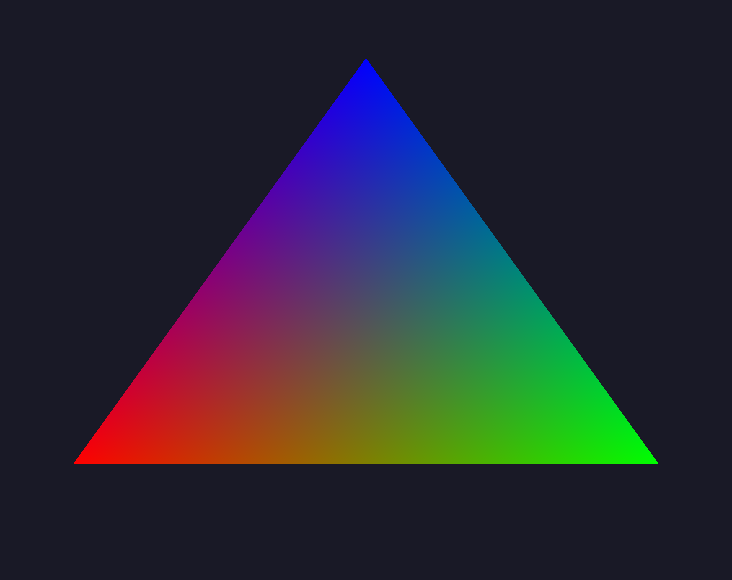

The same door leads to simulations: in 05f_Galaxy, 8000 stars attract each other in a compute shader, and the drawable reads the buffer the computation just wrote. This screenshot on the right shows initial step of the galaxy simulation.
struct Velocity { compages::Vector3f value; };      // your data: a plain struct

compages::world::World world;
compages::world::Entity ship = world.entity("Ship").set(Velocity{ { 1, 0, 0 } });
ship.child("Gun").position(0.0f, 0.5f, 0.0f);             // the gun follows the ship

world.each<Velocity>([&](compages::world::Entity e, Velocity& v) {   // a system: a plain loop
    e.position(e.position() + v.value * step.elapsed);
});
world.update(step);                                       // routines, joints, matrices
This runs in a unit test, with no OpenGL. Joints too: .revolute(axis, -90.0_deg, 90.0_deg).joint().angle(30.0_deg), and the children follow.
compages::renderer::Scene scene(world);

// At setup
scene.camera().position(0.0f, 1.0f, 3.0f).add<compages::world::Orbit>();
scene.sun("Sun", { 1.0f, 0.95f, 0.85f }, 1.4f);
compages::world::Entity cube = scene.box("Cube", compages::renderer::color(0.9f, 0.18f, 0.12f));

// Every frame
cube.rotate(frame.elapsed, { 0.4f, 1.0f, 0.0f });
scene.draw(frame);
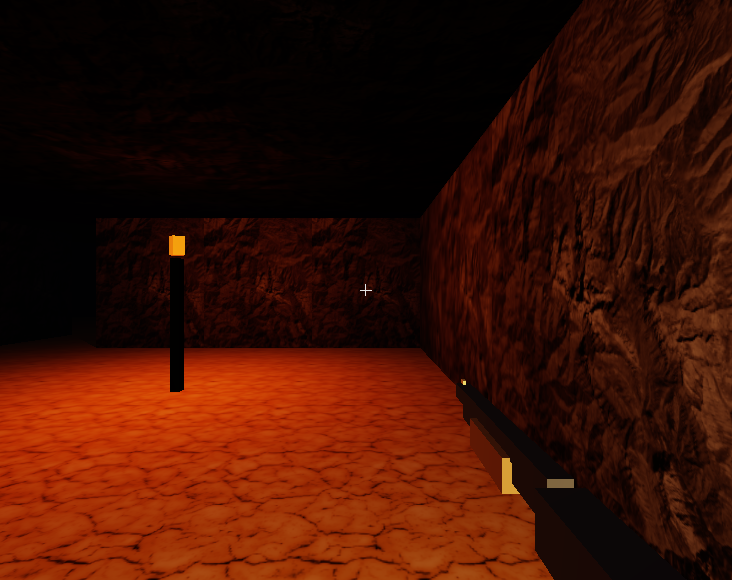
scene.loadFile(...) reads some glTF files used for games but also files such as STL and URDF used in robotic (with their joints). The gallery goes up to a small Doom-like game or basic robot forward kinematic.
Details, Fedora, CI without screen, system install: build and install.
You need Linux, a C++20 compiler, Make, CMake, Git, pkg-config, GLFW and an OpenGL 4.5 driver. Note: macOS stops at OpenGL 4.1 I will see how to manage this.
git clone --recurse-submodules https://github.com/Lecrapouille/Compages.git

cd Compages

make

make run-Compages-examples   # the gallery: every demo, its source, GPU counters
Keyboard keys: PgUp / PgDn change demo, F1 hides the panels. Then follow the tutorials.
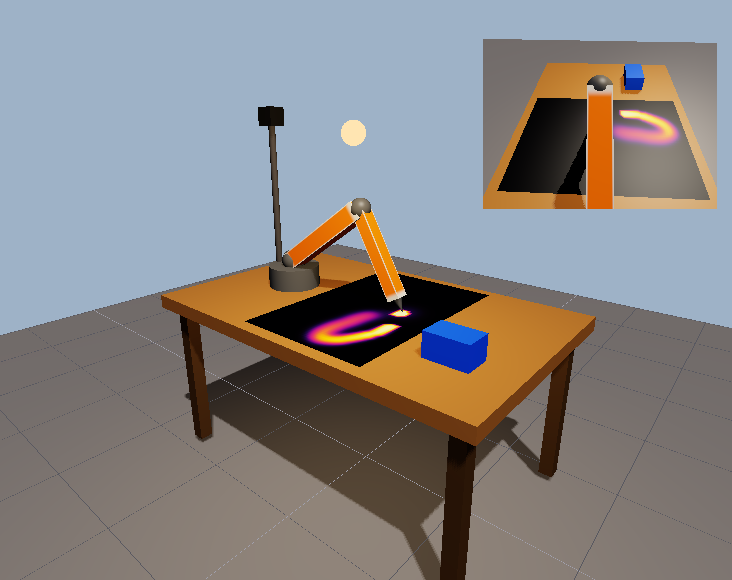
Start with the tutorials. They follow the three layers: a shader and some numbers on the GPU, then a robot arm in a World with no screen, then the workshop above drawn by the Renderer, one idea per page.
Then:
- the guides show how to do one task: load a model, light a scene, add a second view, compute on the GPU, find why a window is black;
- the techniques explain one effect each, with when to use it and what it costs;
- the case studies follow a whole demo, from the equation or the paper to the picture;
- the concepts explain why Compages is built this way;
- the reference lists the calls, the demos and the shader library.
Coding agents: AGENTS.md and the skills of .claude/skills/.
Compages is dual-licensed: GNU GPL v3 or later, or a commercial license for those who cannot use the GPL. See LICENSING.md.