Repository navigation
Web_Example
This page walks through a complete solve in the web interface. The example finds the smallest interval that contains a set of sampled points and certifies how likely a new point is to fall outside it. You will:
- enter the problem by hand in the matrix editors (Route A), or load it in one step from a program file (Route B);
- upload the scenario data and solve;
- read every number in the results;
- optionally, run a parameter sweep and look at the graph it produces.
Use the hosted app at https://scen-opt.woodingben.com or a local copy (see Local Install). The steps and numbers on this page were checked against the current code with the default solver, CLARABEL.
We have
Point
In Scen-Opt's LP form,
The problem is a robust LP: minimize
| Size | Value | Meaning |
|---|---|---|
| 2 | decision variables | |
| 2 | rows of |
|
| 0 | rows of |
|
| 1 | uncertainty dimension: each scenario is a single number |
The risk of a solution
The example is the LP_half_width_2d benchmark. Its data folder is benchmarks/LP_half_width_2d/data/. Download two files:
-
scenarios.csv: the 100 scenarios, one number per line, with no header. -
program_symbolic.json: the whole problem definition. You need it for Route B only.
In symbolic mode, a scenario file has one row per scenario and one column per component of
| Element | Where | What it does |
|---|---|---|
| LP / QP / SDP tabs | top left | Choose the program class. |
| Upload Program | top right | Load a complete problem from a JSON or MAT file (Route B). |
| Symbolic / Numeric switch | top of the program card | Choose how the scenario-dependent matrices are given. This example uses Symbolic. |
| Select Option | program card | Choose the formulation: Robust, Regularization, Relaxation, or Regularization + Relaxation. |
| Formula | program card | Shows the program for the chosen option. Its symbols match the names on the input buttons. |
| Dimension fields |
below the formula | Set the problem sizes. Changing a size reshapes the matrices you have already entered: it pads with zeros or cuts off entries. |
|
Edit |
program card | Open a matrix editor. |
|
|
program card | Appear only when the chosen option uses them. The solve uses only the parameters of the chosen option; hidden fields are ignored. |
| Confidence |
lower left | Enter |
| Solver | lower left | Solvers installed on the server that suit the active program type (and the cones that the chosen regularization norm needs). |
| Scenarios | lower right | Upload the scenario data file. |
| Solve | lower right | Validate the inputs and run the solve. |
| Result | bottom | Results table, graphs and downloads. |
Most inputs have a ? icon. Hover over it to see a short explanation.
Each matrix editor has:
- a grid with one input box per entry, sized from the dimension fields;
- an Or paste JSON content box;
- an Input Format Reference section.
The editor checks entries as you type. If the paste box is not empty when you press Save, its content replaces the grid.
-
Open the app. The LP tab, the Symbolic mode and the Robust option are already selected. The formula reads
$\min_x\ c^\top x$ subject to$A(\delta_i)\ x + b(\delta_i) \le 0$ and$Gx + h \le 0$ . -
Set the dimensions:
- leave
$d$ at 2; - change
$\mathfrak{m}$ from 1 to 2; - change
$\mathfrak{n}$ from 1 to 0.
With
$\mathfrak{n} = 0$ , the Edit$G$ and Edit$h$ buttons are greyed out, because the problem has no hard constraints. - leave
-
Click Edit
$c$ . In the 2×1 grid, enter0and1, then press Save. -
Click Edit
$A(\delta)$ . In the 2×2 grid, enter-1,-1in the first row and1,-1in the second row. Press Save. -
Click Edit
$b(\delta)$ . In the 2×1 grid, enterdelta[0]and-delta[0], then press Save.delta[0]is the first component of$\delta$ , which is the first column of the scenario file. Here$\delta$ has only one component. -
In Confidence
$1-\beta$ where$\beta$ , enter1e-6. This field takes$\beta$ itself, not$1-\beta$ , and it must lie strictly between 0 and 1. If it is empty or out of range, Solve shows the red messageEnter the confidence parameter β, a number between 0 and 1 (e.g. 1e-06).and nothing is sent to the server. -
Leave Solver at CLARABEL, the first entry in the list.
-
Under Scenarios, click Choose File and select
scenarios.csv. -
Press Solve.
Pasting JSON instead of typing. In step 5, for example, you can paste [["delta[0]"], ["-delta[0]"]] into the editor's paste box instead of filling the grid. Numbers may be plain or quoted: [[0], [1]] and [["0"], ["1"]] both work for delta or other expressions must be quoted strings.
Checks before solving. If an input is missing or has the wrong shape, or A(δ) is 1×2 but expected 2×2. or No scenarios file uploaded. …. Fix the input and press Solve again. If the server itself rejects an input (for example an expression it cannot evaluate, such as disallowed name: x), the Result panel shows that message in a red box.
-
Open the app and click Upload Program (top right).
-
Give the program in one of two ways:
- under Upload file, choose
program_symbolic.json; or - paste the file's text into Or paste JSON content.
If you do both, the file is used.
- under Upload file, choose
-
Click Load. A message confirms: LP problem loaded successfully. Upload scenarios and press Solve.
The page is now set up exactly as at the end of step 6 of Route A:
- LP tab, Symbolic mode, Robust option;
-
$d = 2$ ,$\mathfrak{m} = 2$ ,$\mathfrak{n} = 0$ ; -
$c$ ,$A(\delta)$ and$b(\delta)$ filled in; -
$\beta$ =1e-06.
Loading a program clears, on every tab, the matrices and the
$\tau$ ,$\rho$ ,$p$ and$\bar{x}$ fields, and removes any earlier result. The$\beta$ field keeps its old value unless the file setsconfidence. -
Under Scenarios, choose
scenarios.csv. The program file does not contain the scenarios; you always upload them separately. -
Leave the solver at CLARABEL and press Solve.
The program file contains the following (reformatted here; the key order does not matter):
{
  "type": "LP",
  "mode": "symbolic",
  "n_x": 2,
  "rows_A": 2,
  "rows_G": 0,
  "c":   [["0"], ["1"]],
  "A_d": [["-1", "-1"], ["1", "-1"]],
  "b_d": [["delta[0]"], ["-delta[0]"]],
  "rho": "0",
  "tau": "0",
  "confidence": "1e-06"
}
The meaning of every key is given in Program file reference below.
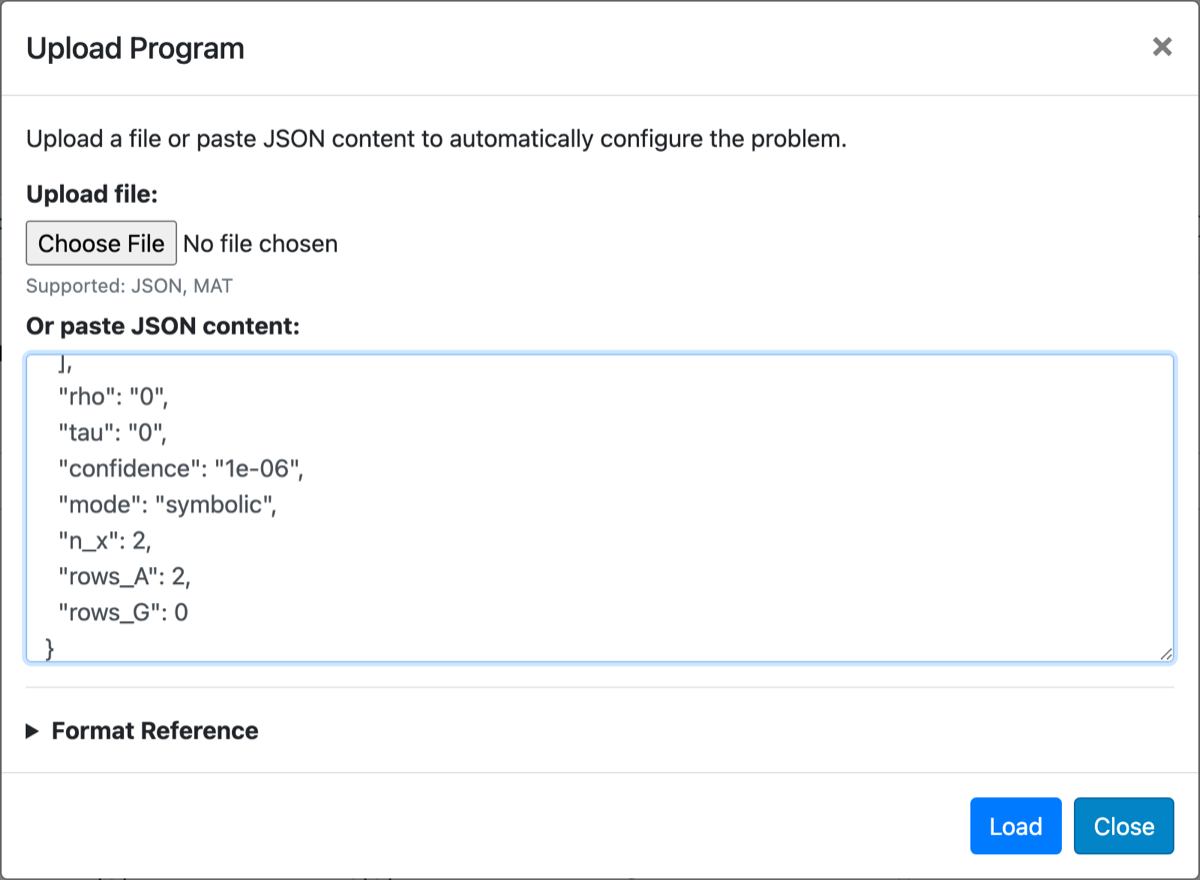
The same folder has a numeric version of the problem, for use when you cannot write the constraints as formulas.
-
Program file.
program_numeric.jsonsets"mode": "numeric"and contains noA_dorb_d. -
Scenario file. Each row of
scenarios_numeric.csvholds one scenario's evaluated constraint data. It contains$A_i$ flattened row by row, followed by$b_i$ :$[\ A_{11}, A_{12}, A_{21}, A_{22}, b_1, b_2\ ] = [-1, -1, 1, -1, \delta_i, -\delta_i]$ . That is$\mathfrak{m} d + \mathfrak{m} = 6$ numbers per row.
To use it:
- Load
program_numeric.jsonwith Upload Program. The switch moves to Numeric, and the$A(\delta)$ and$b(\delta)$ buttons disappear. - Upload
scenarios_numeric.csvand press Solve.
The results are the same as in symbolic mode.
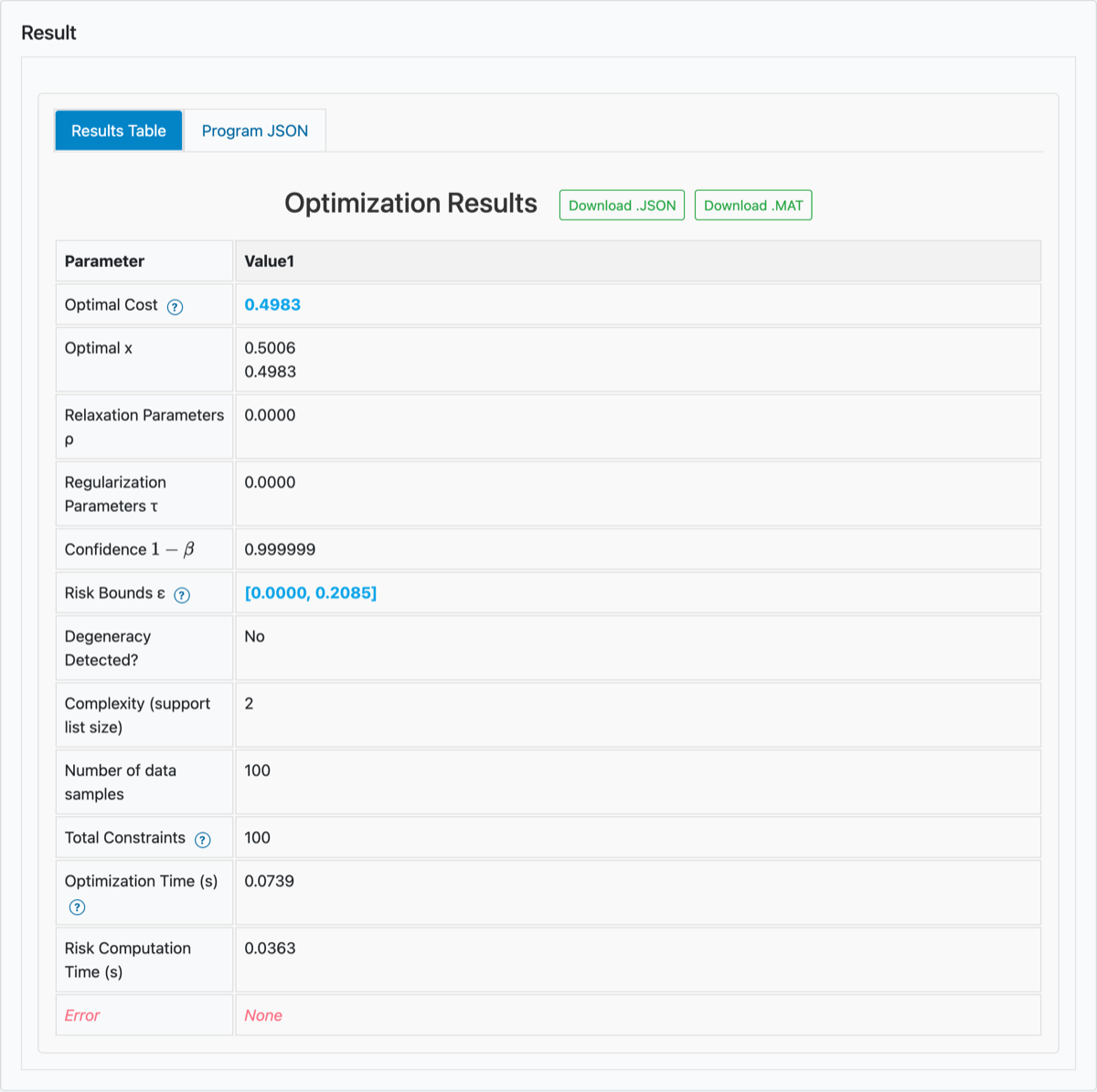
Both routes give the same Results Table. The table rounds numbers for display; the downloads keep full precision. Times vary from run to run.
| Row | Shown | Meaning |
|---|---|---|
| Optimal Cost | 0.4983 |
|
| Optimal x | 0.5006, 0.4983 |
|
| Relaxation Parameters ρ | 0.0000 | The |
| Regularization Parameters τ | 0.0000 | The |
| Confidence |
0.999999 |
|
| Risk Bounds ε | [0.0000, 0.2085] |
|
| Degeneracy Detected? | No | Whether the lower bound is certified (see below). |
| Complexity (support list size) | 2 |
|
| Number of data samples | 100 |
|
| Total Constraints | 100 | The |
| Optimization Time (s) | varies (well under 1 s here) | Time for the solve, including the support-list computation, which re-solves the program. |
| Risk Computation Time (s) | varies (well under 1 s here) | Time to compute the risk bounds. |
| Error | None | Error message from the solver, if any. |
At full precision,
-
The interval.
$[o^\ast - w^\ast,\ o^\ast + w^\ast] = [0.0023,\ 0.9989]$ . Its ends are the smallest and the largest data point, which are on lines 90 and 95 ofscenarios.csv. -
Complexity
$k = 2$ . These two points form the support list. Removing either one would shrink the interval; removing any other point changes nothing. -
Risk bounds. With confidence at least
$1 - 10^{-6}$ , the probability that a new point from the same distribution falls outside the interval is between 0 and 0.2085. Nothing is assumed about the distribution.- The upper bound
$\varepsilon_U$ holds for every solution. - The lower bound
$\varepsilon_L$ holds only for non-degenerate problems. Here Degeneracy Detected? is No, so both bounds apply. When the flag is Yes, the table shows the bounds as, for example,[N/A, 0.2067]: only$\varepsilon_U$ is certified. (This is what you get if you add a second copy of the largest point toscenarios.csv:$N = 101$ ,$k = 2$ , degeneracy Yes.)
See Scenario Theory for the theorems.
- The upper bound
-
The bounds depend only on
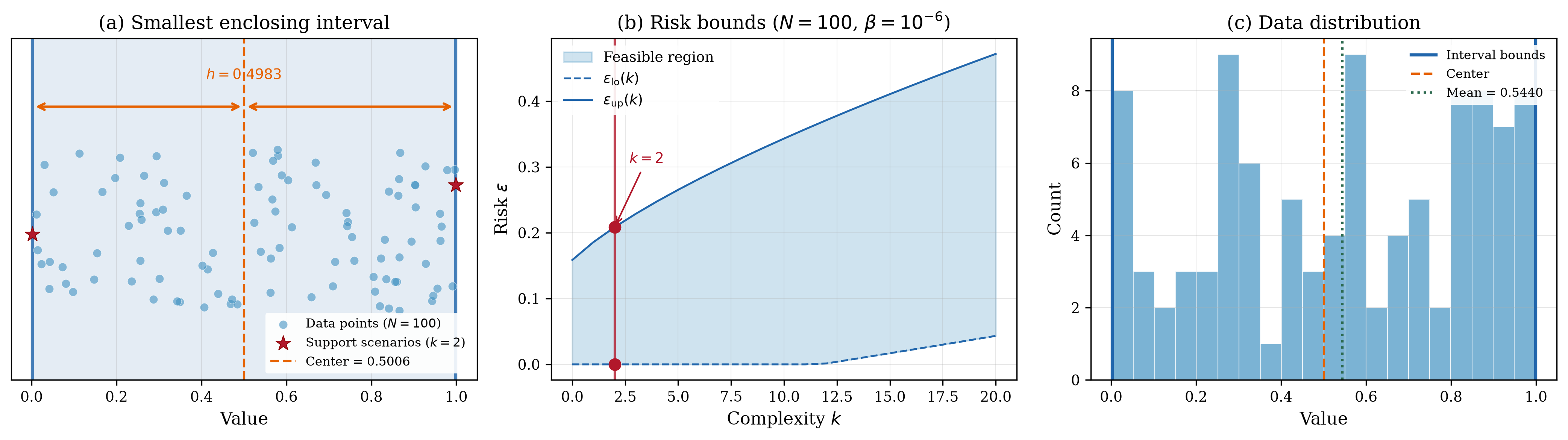
$k$ ,$N$ and$\beta$ . For$N = 100$ and$\beta = 10^{-6}$ :$k$ 0 1 2 3 $[\varepsilon_L, \varepsilon_U]$ [0, 0.1586] [0, 0.1858] [0, 0.2085] [0, 0.2289] A solution supported by fewer scenarios receives a tighter certificate.
The benchmark's own figure shows the same results:
- (a) the interval and its two support scenarios (the figure calls the half-width
$h$ ); - (b) the bounds as functions of
$k$ ; - (c) a histogram of the data.
Solver accuracy matters for
$k$ . Scen-Opt finds the support list by re-solving the problem without some of the scenarios and comparing optimal values. This needs accurate solutions. On this example CLARABEL, SCIPY and SCS all give$k = 2$ , as does the published MOSEK result, but the first-order solver SCS can overestimate$k$ on other problems: on the 200-point interval example of LP.py it returns$k = 31$ with Degeneracy Detected? Yes, where CLARABEL returns$k = 2$ . Prefer an accurate interior-point solver such as MOSEK (recommended) or CLARABEL. If$k$ looks too large, or degeneracy is flagged unexpectedly, try another solver.
| Tab | When shown | Content |
|---|---|---|
| Results Table | always | The table above, with Download .JSON and Download .MAT buttons. |
| ρ Graph | options Relaxation and Regularization + Relaxation | Risk bounds and cost plotted against |
| τ Graph | options Regularization and Regularization + Relaxation | Risk bounds and cost plotted against |
| Program JSON | always | The problem as an Upload Program file, with a Download Program (.JSON) button. Upload this file later to restore the same set-up. |
For the robust example, only Results Table and Program JSON appear.
Download .JSON saves results.json; Download .MAT saves results.mat, which the server generates. Both files contain the keys below. Each key holds a list with one entry per conf and n_attempts. If a run in a sweep failed, its missing results are stored as NaN in the .mat file.
| Key | Content |
|---|---|
optimal_x |
optimal |
optimal_s |
slacks |
optimal_cost |
optimal cost |
num_deltas |
|
tot_con |
Total Constraints: |
active_con |
|
risk |
|
conf |
the reported overall confidence |
rho_, tau_
|
the parameter values |
degeneracy |
degeneracy flag |
errorcode |
error message, or None
|
solve_time, risk_time
|
times in seconds |
n_attempts |
number of solves |
With relaxation, the interval may leave some points outside. Each unit of violation costs
- After the robust solve, change Select Option to Relaxation.
- The formula changes to
$\min_{x,\ \zeta_i \ge 0}\ c^\top x + \rho \sum_i \zeta_i$ subject to$A(\delta_i)\ x + b(\delta_i) \le \zeta_i$ . - A
$\rho \ge 0$ field appears. - Changing the option clears the
$\tau$ ,$\rho$ ,$p$ and$\bar{x}$ fields.
- The formula changes to
- In the
$\rho$ field, enter0.07,0.15,0.3,1. A countern_ρ = 4appears above the confidence field, and its label changes to "Confidence$1 - \beta \cdot n_\rho$ where$\beta$ ". - Press Solve. Scen-Opt solves four programs, one per value of
$\rho$ , and the table gets one column per value:
| 0.07 | 0.15 | 0.3 | 1 | |
|---|---|---|---|---|
| Optimal cost |
0.4517 | 0.4779 | 0.4923 | 0.4983 |
| Points outside the interval | 14 | 6 | 2 | 0 |
| Complexity |
16 | 8 | 4 | 2 |
| Risk bounds | [0.0221, 0.4234] | [0, 0.3137] | [0, 0.2476] | [0, 0.2085] |
| Degeneracy detected | No | No | No | No |
The point counts come from the Optimal ζ row, which now appears in the table. Entries of order
Reading the table:
- A smaller
$\rho$ makes violations cheaper. The interval gets narrower and leaves more points outside. - The support list then contains the violated points plus the two boundary points, so
$k$ grows. The risk certificate gets weaker as$k$ grows. - At
$\rho = 1$ , no point is outside, and the result equals the robust solution.
Confidence. The certificate now covers all four solves together (a union bound), so the table reports
Choice of values. The values
The ρ Graph tab now appears. It plots the lower bound (green), the upper bound (blue) and the cost (black) against
The Upload Program dialog reads the keys below. Its Format Reference section lists them for each program type.
| Key | Needed | Meaning |
|---|---|---|
type |
always |
"LP", "QP" or "SDP". Selects the tab. |
mode |
optional |
"symbolic" (default) or "numeric". |
option |
optional |
"robust", "regularization", "relaxation" or "regularization-relaxation". See the note below the table. |
n_x |
optional |
c, so n_x must agree with it. |
rows_A |
numeric mode |
A_d when A_d is given, so you need it only in numeric mode. |
rows_G |
optional |
G when G is given. The value 0 means no hard constraints. |
c |
always | Cost vector, |
A_d |
symbolic LP/QP |
delta[k]. |
b_d |
symbolic LP/QP |
delta[k]. |
G, h
|
optional | Hard constraints delta. Give both or neither. |
Q |
QP |
|
rho |
for relaxation |
"0.07,0.15,0.3,1". |
tau |
for regularization |
|
confidence |
set it |
"1e-06", not |
p |
optional | Norm order for regularization: a number "inf" or "fro". Default 2. |
x_ref |
optional | Regularization reference point |
F_d, E, lmi_size, lmi_e_size
|
SDP | See Semidefinite Programs. |
How option is inferred. If option is missing, a rho above 0 switches on relaxation and a tau above 0 switches on regularization. The inference reads only the first number of a list. For a sweep that starts at 0, such as "0,0.5,1", set option explicitly.
-
Every matrix and vector is a 2-D array of rows. A vector is a column:
"c": [[0], [1]]. -
Numbers may be plain or quoted.
[[0], [1]]and[["0"], ["1"]]are the same. The benchmark files quote every entry; either style works. An entry that contains an expression, such as"delta[0]"or"1/2", must be a quoted string. -
delta[k]is 0-indexed.delta[0]is the first column of the scenario file, anddelta[q-1]is the last. When each scenario is a single number,delta[0]is that number. -
Allowed expression syntax in
A_d,b_d(andF_d):- numbers;
- the operators
+ - * / // % **and parentheses;^also means power, as in SymPy (delta[0]^2isdelta[0]**2, with the same precedence); -
delta[k]; - the functions
sin,cos,tan,asin,acos,atan,atan2,sinh,cosh,tanh,exp,log,ln,log10,log2,sqrt,abs(orAbs),floor,ceil(orceiling),min(orMin) andmax(orMax), e.g.sin(delta[1])orexp(-delta[0]); - the constants
pi,eandE; - functions and constants of Python's
mathmodule with themath.prefix, e.g.math.sin(delta[1]).
Any other name is rejected, for example
sec(delta[0])gives the Error row messagedisallowed name: sec. -
c,G,h,QandEcannot containdelta. In a program file their entries may be numbers or constant expressions such as"1/2"or"pi"; the matrix editors accept plain numbers only for them.x_refmust hold numbers. -
Unused optional fields can be omitted or left empty (
[],""ornull), e.g."G": []for a problem without hard constraints. -
MAT files use the same variable names. Matrices may be numeric arrays, e.g.
c = [0; 1], or cell arrays of strings, which you need for expressions, e.g.b_d = {'delta[0]'; '-delta[0]'}. A 1×1 numeric array is read as a plain number, so store a 1×1 matrix as a cell array, e.g.b_d = {'1'}. Scalars such asrho = 0may be plain numbers.
| Symptom | Cause and fix |
|---|---|
| Red message above Solve | An input is missing or has a shape that does not match |
| Red Error: box instead of the results | The server rejected an input before solving, e.g. could not convert string to float: 'delta' when the scenario file has a header row, or disallowed name: x for an expression in |
| The Error row shows a message | That column failed, e.g. delta[1] does not exist: the scenario has 1 component(s), LP did not solve to optimality. Status: unbounded, ..., or MOSEK license cannot be located or is incorrect. (see Local Install). The other columns are still computed. Check the inputs or try another solver. |
| This problem is taking a while note | On the hosted app, a solve that runs for more than 30 s shows this note. Large problems are better solved on your own machine; see Local Install. |
| Large |
Possibly an inaccurate solver (see the solver-accuracy note above). Try MOSEK or CLARABEL. |
| Problem loaded with the wrong formulation | Add an explicit option key to the program file. |
- First Example: Python Calls: solve the same problem from Python.
- Linear Programs: all LP options, including hard constraints and numeric mode.
- In-built Graphics: the ρ and τ graphs in detail.
- Scenario Theory: where the risk bounds come from.
- The other benchmarks: each of the twelve case studies in
benchmarks/(listed in the repository README) has adata/folder with the pairsprogram_symbolic.json+scenarios.csvandprogram_numeric.json+scenarios_numeric.csv. You can load them in the same way.